For asset-intensive industries, the stakes are higher. Engineering, maintenance, and operational data are often scattered across decades-old systems that were never designed to talk to each other. A rushed migration doesn't just create IT headaches. It can compromise safety records, break asset hierarchies, and stall digital transformation for years.
Outcomes vary widely depending on planning, data quality, migration approach, and execution discipline. This guide walks through the exact steps, prerequisites, success factors, and mistakes to avoid.
Key Takeaways
- Success starts with business objectives and stakeholder alignment, not IT alone
- A staged, six-phase approach curbs data loss and budget overruns
- Data quality, strategy, and stakeholder buy-in decide success or failure
- Most failures stem from skipped audits and weak change management
Step 1: Define Objectives, Scope, and Success Metrics
Before touching a single record, get clear on why you're migrating. Cost reduction, compliance readiness, and analytics enablement all demand different priorities and different KPIs.
Set measurable thresholds upfront:
- Downtime tolerance (how many hours can operations realistically absorb?)
- Data accuracy thresholds (what percentage of records must validate cleanly before go-live?)
- Scope boundaries (which systems, tags, and document types are in, and which are explicitly out?)
With thresholds and boundaries defined, the next hurdle is organizational buy-in. Secure executive sponsorship and budget approval before work begins. Migrations that lack a senior champion tend to lose funding the moment they hit a snag.
For capital-intensive industries, scope planning also needs to account for regulatory retention. Certain record types carry mandatory retention periods, some running for decades or the entire life of the asset:
- Process safety records
- Environmental documentation
- Inspection history
Classify these records early so nothing gets archived or discarded that shouldn't be.
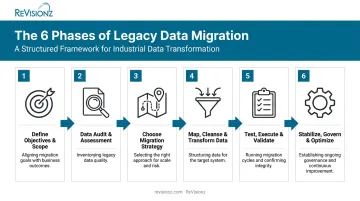
Step 2: Conduct a Comprehensive Data Audit and Assessment
You can't migrate what you don't understand. Audit the legacy system's structure, volume, and quality to decide what gets migrated, archived, or discarded entirely.
This step also means mapping data lineage and dependencies. Where does a piece of equipment data originate? What downstream systems rely on it? In asset-heavy operations, that data is frequently siloed across engineering, maintenance, and operations platforms with no single owner.
Data owners and domain experts need to be identified early, since they validate context that a spreadsheet alone can't provide.
ReVisionz encountered this scale of challenge in a multi-year LNG operator engagement, where the audit and consolidation phase involved reconciling more than 300,000 tags and 800,000 documents before retiring costly legacy systems. That kind of volume makes a rigorous, upfront audit non-negotiable rather than optional.
Data volume and quality aren't the only readiness factors, though. Round out the audit with a technical readiness check: hardware constraints, integration points, and compatibility between legacy and target environments.
Step 3: Choose Your Migration Strategy and Tools
There's no universal "best" migration approach. The right one depends on downtime tolerance and system complexity.
| Approach | Best for | Tradeoff |
|---|---|---|
| Big bang | Smaller, less complex systems | Faster and cheaper, but concentrates risk into one cutover window |
| Phased/incremental | Complex, high-dependency systems | Reduces outage risk, but requires longer coexistence and reconciliation |
| Parallel run | Mission-critical operations | Provides a safety net, but duplicates effort and cost temporarily |
Once you've picked an approach, match your tools to the data type and target architecture. That could mean ETL/ELT platforms, cloud-native migration services, or custom scripts for highly specialized engineering data formats.
Team structure matters as much as tool selection. Assemble a cross-functional migration team with clearly documented roles:
- Architects to design the migration approach
- Domain experts to validate data accuracy
- Security officers to enforce compliance requirements
- A project manager to own the timeline
ReVisionz takes a technology-agnostic approach here, working across platforms like Hexagon, AVEVA, OpenText, Cognite, and VEERUM based on what the client environment already runs on. Forcing a single toolset onto every project rarely produces the best outcome.

Step 4: Map, Cleanse, and Transform Data for the New System
This is where most migrations quietly go wrong. Field-to-field mapping looks simple until you realize the legacy schema doesn't cleanly translate to the new one.
Build a data dictionary that maps every legacy field to its target counterpart while preserving referential integrity, meaning primary and foreign keys stay intact and relationships between records don't break.
Core cleansing tasks include:
- Deduplication — removing duplicate asset records that accumulated over years of manual entry
- Standardization — aligning naming conventions, units, and codes across sites
- Error correction — fixing incomplete or contradictory field values before they propagate forward
Treating this step as a copy-paste exercise is a common and costly mistake. ReVisionz built its data migration and enrichment methodology over two decades of asset information management programs. Applying frameworks like ISO 15926 and CFIHOS, the process structures, validates, and enriches engineering and asset data for how operations teams actually use it.
In one materials management engagement, this level of rigor delivered enriched asset data with a documented 0% rework requirement after handover.
Step 5: Test, Execute, and Validate the Migration
Never migrate production data straight into a live target system. Set up a staging or sandbox environment that mirrors production conditions and run a pilot migration first. This is where schema issues, performance bottlenecks, and mapping errors surface, before they become expensive.
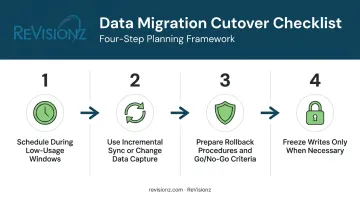
Once the pilot succeeds, turn your attention to cutover planning:
- Schedule during low-usage windows based on actual operating patterns, not assumptions
- Use incremental sync or change data capture to minimize the final downtime window
- Prepare rollback procedures and define go/no-go criteria before you start
- Freeze writes only when strictly necessary, since locking source systems too early can extend outages
Once data lands in the target system, validate it against the source:
- Check completeness against source record counts
- Reconcile data fields to confirm mapping accuracy
- Run functional tests to verify system behavior
Skipping reconciliation is how organizations discover missing maintenance history months after go-live, when it's far harder to fix.
Step 6: Stabilize, Govern, and Optimize Post-Migration
Go-live isn't the finish line. Run a post-migration audit to confirm zero data loss, monitor system performance under real operating load, and only then move toward securely decommissioning the legacy system.
Ongoing governance matters just as much as the migration itself:
- Access controls tied to roles, not individuals
- Retention policies aligned to the compliance requirements identified in Step 1
- Continuous data quality monitoring, not a one-time check
Governance keeps the system compliant, but adoption keeps it in use. User training and clear documentation drive that adoption; without them, employees slip back into old workarounds, and the new system never becomes the trusted source of truth it was meant to be.
Long-term value comes from keeping that data working after go-live. AI-powered services like ReVisionz's MIC+ keep migrated asset data lifecycle-ready, fueling predictive maintenance and analytics well after the project team has moved on.
When Does Legacy Data Migration Make Sense?
Migration isn't automatically the right move. Sometimes integration or targeted modernization delivers a better return with less risk.
Common triggers that justify a full migration:
- Rising maintenance costs on unsupported infrastructure
- Vendor end-of-life or discontinued support
- Compliance mandates requiring modern audit trails
- M&A system consolidation, merging duplicate platforms into one
- Preparing the data foundation for cloud or AI initiatives
When migration becomes the riskier choice:
Very large, tightly coupled, poorly documented legacy systems don't always benefit from a full rip-and-replace. In these cases, API-led integration or phased "wrapping" (sometimes called the strangler fig pattern) lets you route functions to modern services incrementally while the legacy system stays operational.
ReVisionz applies this same phased approach in its Legacy Information Modernization engagements, routing critical functions to modern platforms first and reserving deeper structural changes for after early wins build internal confidence.
What You Need Before Starting a Legacy Data Migration
Preparation determines the outcome far more than which tool you choose.
Equipment and System Requirements
Your target system needs to offer:
- Scalability for future data growth
- Strong security controls
- Integration APIs that can actually receive the migrated data without custom workarounds at every turn
Data and Documentation Readiness
Before migration starts, you need:
- Validated source data
- Complete documentation or data dictionaries
- Defined quality benchmarks
Going in without these is how timelines quietly double.
Team and Compliance Readiness
Line up before execution begins:
- A dedicated cross-functional team
- Confirmed stakeholder buy-in
- Compliance or security sign-off
Retrofitting approvals mid-project stalls momentum and erodes confidence.
Key Factors That Determine Migration Success
Three variables consistently decide whether a migration succeeds or stalls.
Data quality and completeness shapes whether the new system earns trust from day one. Poor-quality source data corrupts decision-making and undermines confidence before launch.
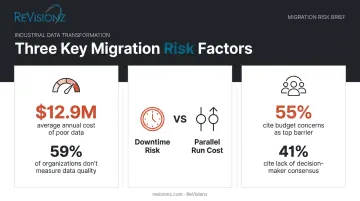
According to Gartner's data quality research, poor data quality costs organizations at least $12.9 million annually on average, and 59% of organizations don't measure data quality at all. Incomplete or inaccurate data increases rework, delays go-live, and inflates project costs.
Migration approach (big bang vs. phased) determines your downtime exposure and resourcing needs. Pick wrong, and you either face an extended outage or get stuck running two systems in parallel far longer than budgeted.
Stakeholder engagement and change management drive long-term adoption and governance. Buy-in must come from data owners and end users, not just IT.
According to Deloitte's data modernization research, which surveyed 504 US IT respondents, budget concerns (55%) and lack of consensus among decision-makers (41%) are the top barriers to data modernization. Low engagement leads directly to poor adoption and reversion to old workarounds.
Common Mistakes to Avoid During Legacy Data Migration
- Skipping the data audit: jumping straight into migration without understanding volume and quality creates costly surprises mid-project. Complete a thorough audit first, every time.
- Underestimating data mapping complexity: treating field-to-field mapping as a checkbox task instead of validating business rules breaks referential integrity. Use a formal data dictionary and rigorous testing.
- Ignoring change management and training: migrating data without preparing end-users leads to poor adoption and a quiet return to legacy workarounds. Build training and communication into the plan from day one.
Frequently Asked Questions
What is legacy system migration?
Legacy system migration moves data, applications, or workloads from outdated systems to modern platforms, improving performance, security, and compliance. It typically retires the legacy platform once complete.
What is a legacy data example?
Common examples include data stored in obsolete databases, unsupported ERP systems, or outdated engineering and asset registers still running on retired software. In industrial settings, this often includes equipment hierarchies and maintenance history trapped in discontinued systems.
What are the four types of data migration?
The four main types are:
- Storage migration: Moves data between storage devices
- Database migration: Shifts data to a new database engine
- Application migration: Relocates an app and its data model
- Cloud migration: Moves workloads on-premises to the cloud, or between clouds
How long does a legacy data migration typically take?
Timelines range from days to months depending on data volume, system complexity, and chosen approach. Large, multi-site asset systems typically require multiple phased waves rather than a single cutover.
What's the difference between data migration and data integration?
Migration is typically a one-time move to a new system, after which the legacy platform is retired. Integration is an ongoing process of unifying data from multiple active sources that all remain in use.
How can businesses minimize downtime during a legacy data migration?
Use phased or incremental migration paired with change data capture, so historical data loads while the source stays live. Schedule the final cutover during a measured low-usage window and rehearse rollback procedures beforehand.