That's the reality behind legacy data migration: moving engineering, operational, and asset data out of outdated platforms into modern, lifecycle-ready environments. This guide is written for engineering, IT, and asset management leaders in oil & gas, chemicals, mining, and manufacturing, where bad or missing data doesn't just slow down a project. It creates safety and compliance exposure.
Migration gets treated as a simple copy-paste IT task more often than it should. It isn't. Below, we cover what it actually involves, why it matters, how the process works, and where these projects typically go wrong.
TL;DR
- Legacy data migration merges engineering, operational, and asset data into one trusted source.
- Two paths exist: lift-and-shift for speed or modernization for scalability.
- The core process flow is consistent: assess, map, cleanse/enrich, migrate, validate.
- Success depends as much on governance and stakeholder alignment as on execution.
What Is Data Migration from Legacy Systems?
Data migration from legacy systems means transferring transactional, engineering, or asset-related information out of outdated, often unsupported platforms and into modern ones. The goal goes beyond relocation: a data environment that's trusted, accessible, and standardized enough to support both current operations and whatever comes next, whether that's a new ERP, an EAM upgrade, or a digital twin.
That "whatever comes next" gets complicated fast, because in asset-intensive industries, "data" rarely means simple database rows. It usually means P&IDs, tag and equipment records, 3D models, and controlled engineering documents scattered across decades of platform changes. That's a different, harder problem than migrating a customer database.
How Migration Differs from Related Concepts
People often use migration, integration, and modernization interchangeably. They shouldn't be.
| Term | What it means | Key distinction |
|---|---|---|
| Data migration | Transfer of data between systems, formats, or storage environments | Bounded movement from source to destination; often includes retiring the source (TechTarget) |
| Data integration | Combining data from multiple sources into a unified view | Source systems often keep running; the goal is consolidated access, not retirement |
| Legacy modernization | Upgrading outdated applications, architecture, and processes | Broader than data movement, it can change entire systems and workflows |
| Digital twin enrichment | Adding context and structure to migrated data | Happens after migration, once data is clean enough to model physical assets |
These activities frequently overlap in a single program. But conflating them leads to scope creep and blown budgets, because each one demands a different level of effort and a different success metric.
Why Legacy Data Migration Matters for Asset-Intensive Industries
There's usually a trigger. Rising maintenance costs on unsupported hardware, a vendor sunsetting a platform, a merger that suddenly requires two data environments to become one, or a new compliance mandate that the current system can't report against.
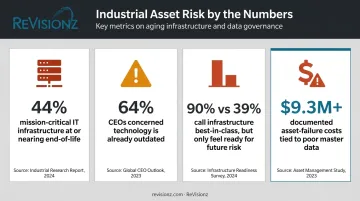
The pressure is broad and growing. In Kyndryl's 2024 survey of 3,200 senior decision-makers, 44% of mission-critical IT infrastructure was at or approaching end-of-life, and 64% of CEOs said they were concerned their technology was already outdated.
Perhaps more telling: 90% of executives described their infrastructure as best-in-class, yet only 39% felt it was actually ready to manage future risk (Kyndryl Readiness Report, 2024).
What Happens Without Migration
Skip it, and the costs don't disappear. They just move:
- Data stays siloed across disconnected systems, with no single source of truth
- Infrastructure spend climbs just to keep dying platforms alive
- Maintenance planning and turnaround execution run on incomplete or stale asset records
- Process safety management compliance becomes harder to demonstrate during audits
A Toronto Metropolitan University and PEMAC practitioner guide found that across four documented asset-failure cases tied to poor master data, costs exceeded $9.3 million (PEMAC Practitioner's Guide, 2024). The figure reflects failure costs connected to unreliable asset master data, not migration budgets specifically, but it illustrates the stakes plainly.
The EPC-to-Owner-Operator Trigger
One scenario shows up constantly in capital projects: handover. Engineering data built during design and construction has to move into operational systems before day one, or the plant starts up blind. In ReVisionz's experience guiding these handovers, the data gaps that surface during commissioning are rarely a surprise to the people closest to the work. They exist because the project team treated information as a handoff obligation, not an asset operations would depend on.
How the Data Migration Process Works: Step-by-Step
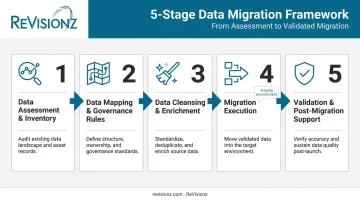
The flow is straightforward on paper: assess, map, cleanse and enrich, migrate, validate. What matters is that each stage builds directly on the quality of the one before it. Skip a step, or rush it, and the errors compound downstream.
Step 1: Data Assessment & Inventory
Before anything moves, you need to know what exists. This means identifying:
- Every legacy system currently in play
- The data types and volumes involved
- Where the data physically or digitally lives A key early decision: does only active data need to move, or does the full historical archive need to come along too? Dragging along years of unused history inflates cost and timeline for no operational benefit.
Step 2: Data Mapping & Governance Rules
Next, legacy fields and schemas map to the new system's structure. Before a single record transfers, standards need to be locked in: tag numbering conventions, equipment classes, naming rules. Industry frameworks like CFIHOS (Capital Facilities Information HandOver Specification) standardize this kind of tag and equipment mapping across the engineering-to-operations lifecycle. They're worth reviewing even if you don't adopt them wholesale.
Step 3: Data Cleansing & Enrichment
This is where most of the real labor happens. Cleansing removes duplicates, corrects inconsistent formats, and fills gaps in metadata. For large volumes of unstructured engineering data, AI-assisted enrichment tools can accelerate this stage. ReVisionz's MIC+ service, for example, is built around applying this kind of enrichment to reduce the manual effort of cleaning up years of inconsistent engineering records.
Step 4: Migration Execution
With clean, mapped data ready, execution begins using ETL, ELT, incremental, or parallel methods depending on volume and risk tolerance. A staging environment is essential here. Testing the migration logic against a copy of production, rather than production itself, catches problems before they touch live systems.
Step 5: Validation & Post-Migration Support
Migration "finishing" isn't the same as migration "working." Reconciliation testing confirms record counts and values match between old and new systems. User acceptance testing confirms the data actually functions for the people who'll use it daily. And governance needs to continue after go-live, because data quality erodes quickly without ongoing oversight.
ReVisionz's engagement with an LNG operator followed this same logic at scale. The structured program was built around a business roadmap, a minimum viable product, and a content migration strategy, ultimately consolidating more than 300,000 tags and 800,000 documents into a unified environment.
Choosing Your Migration Approach: Lift-and-Shift vs. Modernization
Once the process is clear, the bigger strategic question surfaces: move the data as-is, or restructure it along the way?
Lift-and-shift means transferring data with minimal changes to its structure or format.
- Pros: Faster execution, lower upfront cost, less disruption to daily operations
- Cons: Limited scalability, plus legacy inefficiencies that carry over to the new platform instead of getting fixed
Modernization means re-architecting data to fully use the new platform's capabilities.
- Pros: Better long-term scalability, cleaner foundation for analytics or a digital twin
- Cons: Higher upfront investment, longer timeline before value shows up
| Factor | Favors lift-and-shift | Favors modernization |
|---|---|---|
| Data complexity | Low to moderate | High, with inconsistent legacy structures |
| Budget | Constrained, near-term | Available for multi-phase investment |
| Future plans | No immediate digital twin or predictive analytics roadmap | Planning AI-enabled analytics or digital twin adoption |
Neither path is universally right. A plant preparing for predictive maintenance or digital twin adoption needs the re-architected foundation modernization provides. A plant just trying to retire an unsupported system before support contracts lapse may only need lift-and-shift, at least for now.
Common Challenges, Risks, and Misconceptions
The biggest misconception is that migration is a one-time technical copy job. It isn't. Mapping, cleansing, and validation determine most of the outcome, not the transfer itself.
Three challenge categories show up repeatedly:
- Data quality and mapping errors — a tag numbering scheme that made sense in 1998 doesn't translate cleanly into a modern equipment hierarchy without deliberate rework
- System incompatibility — legacy formats, especially unstructured documents and drawings, often don't map neatly to structured target fields
- Downtime and operational disruption — migrating live production data without a staging environment risks interrupting operations that can't afford to pause
No reliable, current industry-wide failure rate exists for legacy migrations specifically, so treat any dramatic percentage you see quoted with skepticism. What is well documented: in ASUG's 2024 research, 46% of SAP S/4HANA adopters said the implementation process took longer than expected. That's a clear signal that underestimating complexity is common even among well-resourced teams.
A migration can complete without errors and still be wrong. Silent inaccuracies, like a missing equipment attribute or a misclassified tag, often don't surface until a compliance audit or an operational report six months later.
That gap between "migration completed" and "data validated" is exactly where most late-stage surprises come from.
Best Practices for a Successful Legacy Data Migration
A handful of habits separate migrations that hold up from ones that quietly fail:
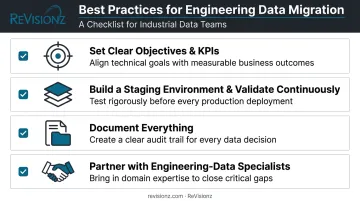
- Set clear objectives and KPIs upfront: cost reduction, compliance readiness, or performance targets give you something concrete to measure after go-live
- Build a staging environment and validate continuously: don't wait until the end to discover problems that should have been caught in week two
- Document everything: data dictionaries and mapping logs aren't bureaucracy; they're what makes compliance audits and future troubleshooting survivable
- Partner with an experienced team when the data is engineering-heavy: P&IDs, tag registers, and 3D models require domain expertise that generic IT migration tools don't provide
ReVisionz has spent more than two decades refining its data migration and enrichment methodology around that last point, working across oil & gas, chemicals, and manufacturing environments where engineering data complexity is the norm.
Specialist involvement de-risks the areas where generalist approaches fall short, particularly mapping accuracy and validation rigor.
Frequently Asked Questions
What is data migration from legacy systems?
It's the process of transferring data from outdated, often unsupported systems into modern platforms to improve accessibility, compliance, and operational performance.
How do you transfer data from legacy systems to SAP?
Start by assessing source data, then map it to SAP's data structures and master data objects. Cleanse the data, then use ETL (extract, transform, load) tools or SAP's Migration Cockpit before running validation checks.
How long does a legacy data migration project take?
Timelines vary widely by volume and complexity. ASUG's 2024 research found SAP S/4HANA migrations averaged 1.5 years, ranging from four months to six years depending on scope (ASUG, 2024).
What's the difference between data migration and legacy system modernization?
Migration moves data as-is or with light adjustments. Modernization restructures both data and systems to fully use new platform capabilities — a bigger, slower undertaking.
Who should be involved in a legacy data migration project?
IT and data teams, business or process owners, compliance stakeholders, and often a third-party migration partner for complex, engineering-heavy environments.
What happens if data isn't properly cleansed before migration?
Duplicates, errors, and inconsistencies carry forward into the new system. That typically surfaces later as reporting inaccuracies, compliance gaps, or costly rework after go-live.