
Many IT teams treat decommissioning as a low-priority cleanup task, something to get to "eventually." In practice, it directly shapes operating costs, data usability, and compliance posture. Rising cybersecurity exposure and the push toward digital twins and AI are making that delay expensive.
This article breaks down what decommissioning legacy systems actually delivers, not the theoretical IT-hygiene version, and how to retire outdated platforms without losing decades of critical asset data in the process.
Key Takeaways
- Decommissioning retires outdated engineering and asset software once it stops serving operational needs.
- Done right, it lowers total cost of ownership, unlocks data for AI, and cuts compliance risk.
- Ignoring it creates silos, inflates IT/OT spend, and widens cybersecurity gaps.
- Treat it as a structured, data-first program — not a one-off IT task.
What Is Legacy System Decommissioning?
Legacy system decommissioning is the structured retirement of outdated engineering, asset management, or operational software and hardware, along with the migration or disposition of the data those systems hold.
You'll typically see it triggered by:
- EPC-to-owner handover: when a capital project transitions to operations
- Mergers and acquisitions: where overlapping systems need consolidation
- ERP, EAM, or CMMS upgrades: replacing platforms that can no longer scale
- Plant modernization and digital twin initiatives: where trapped historical data needs a new home
Decommissioning matters because of what it enables: freed-up budget and access to data that's been locked away for years.
Key Advantages of Decommissioning Legacy Systems
The advantages below focus on outcomes asset-heavy organizations already measure: budget, uptime, compliance, and incident rates. These aren't abstract IT benefits. Each ties to a metric your finance or operations team already tracks.
Reduced Total Cost of Ownership
Keeping redundant or obsolete engineering and asset systems running means paying for licensing, hardware refreshes, and specialized support long after those systems stopped adding value. Consolidating old design tools, spreadsheets, and siloed databases into one modern environment eliminates that duplicate spend.
This matters more than most budgets reflect. A McKinsey survey of 50 CIOs at large financial services and technology companies found 10% to 20% of technology budgets earmarked for new products was instead diverted to fixing technical debt. 60% of those CIOs said their technical debt had visibly grown between 2017 and 2020. Legacy upkeep quietly eats the budget that should be funding modernization.
KPIs impacted:
- Cost per asset record maintained
- Licensing and support spend
- Administrative overhead hours
This advantage hits hardest during M&A integration, multi-site consolidation, or EPC-to-operations handover, situations where overlapping systems are almost guaranteed to exist. ReVisionz's own AIM program work with an LNG operator retired high-cost legacy systems (including OpenText) as part of a broader migration, directly cutting licensing expense while consolidating over 300,000 tags and 800,000 documents into a single environment.
Unlocked, Lifecycle-Ready Data for Analytics and AI
Decommissioning isn't deletion. It requires migrating and enriching decades of P&IDs, tag data, and maintenance history into structured, connected formats that other systems can actually use.
Here's the scale of the problem: IDC's global study for Seagate, surveying 1,500 enterprise leaders across manufacturing and other sectors, found only 32% of available enterprise data was actually put to work. The remaining 68% sat unused, often because it lived in inaccessible legacy silos rather than lacking value.
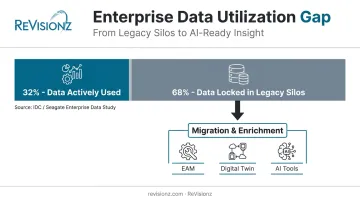
A disciplined migration methodology (cleansing, validation, tagging) turns those dead archives into data usable in EAM, digital twin, or AI/analytics tools. This is where ReVisionz's data migration and enrichment methodology and its AI-powered Main Information Contractor+ (MIC+) service come in, executing this kind of enrichment at scale rather than treating it as a manual, one-off cleanup.
KPIs impacted:
- Data findability and accessibility rates
- Time-to-insight
- Predictive maintenance accuracy
- Engineering rework hours
This advantage becomes critical during digital twin rollouts, AI/ML initiatives, and brownfield modernization projects sitting on top of large volumes of historical data.
Improved Safety, Compliance, and Risk Reduction
Unsupported legacy systems often can't be patched, and they may hold outdated or unverified process safety information. NIST's OT security guidance confirms that legacy systems frequently include vendor-unsupported hardware and software that simply cannot receive new security patches, leaving compensating controls as the only option.
There's a compliance dimension too. OSHA's Process Safety Management standard requires documented process safety information covering chemical hazards, process technology, and equipment: records that must be updated whenever a covered process change occurs. Proper decommissioning ensures those records migrate intact into governed, auditable modern systems rather than getting lost in a shutdown.
KPIs impacted:
- Compliance audit pass rate
- Cybersecurity vulnerability count
- Audit preparation time
This matters most in regulated sectors (oil and gas, chemicals, petrochemicals) and at aging plants approaching end-of-support for critical control systems.
What Happens When Decommissioning Is Missing or Ignored
Deferring decommissioning doesn't freeze the problem. It compounds it.
- Growing dark archives: data that's technically stored somewhere but practically inaccessible, slowing engineering and operational decisions
- Duplicate spend: overlapping software, licensing, and infrastructure costs that inflate IT/OT budgets year after year
- Rising cybersecurity exposure: unsupported, unpatched systems sitting inside your operational network
- Slower handovers and audits: undocumented legacy data turns routine EPC handovers or system upgrades into forensic exercises
- Lost institutional knowledge: subject matter experts retire without ever documenting the data lineage they carried in their heads
One documented petrochemical cracker plant DCS upgrade illustrates the cost of poor as-built data: engineers had to conduct repeated walk-downs, manual surveys, and photograph equipment just to reconstruct information that should have already existed in a system of record. That's the tax you pay for deferring decommissioning long enough.
How to Get the Most Value from Decommissioning
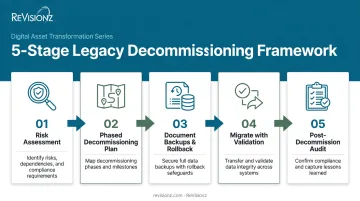
Decommissioning delivers real value when it's treated as a structured program built around a risk assessment, a migration plan, and a decommissioning plan, not an ad hoc IT cleanup squeezed into a shutdown window.
Within that structure, prioritize data quality and lineage throughout the migration. Data should be validated and enriched, not simply archived, so it stays usable for EAM, digital twin, or AI initiatives down the road. An archive nobody can search is barely better than the legacy system you just retired.
Practical steps that reduce risk:
- Run a risk assessment first to identify what's safety-critical, what's compliance-relevant, and what can be deprioritized
- Build a phased decommissioning plan and cut over in stages rather than in a single high-risk event
- Document backups and rollback plans before touching production systems
- Migrate with validation, not just transfer, cleansing and enriching data as it moves instead of just copying it
- Run a post-decommission audit to confirm nothing critical was lost before shutting the legacy system down for good
Partnering with an experienced digital asset enablement specialist helps here. ReVisionz brings over two decades of AIM and digital twin experience, plus a technology-agnostic approach across AVEVA, Hexagon, OpenText, and Cognite ecosystems. That means recommendations are built around what your data needs, not which platform a vendor prefers to sell.
Conclusion
Decommissioning's real value goes beyond IT housekeeping, delivering control and clarity over systems that have been running blind for years. Cost savings and unlocked data compound over time, but only when migration and enrichment are done with discipline rather than treated as a rushed shutdown task.
Treat decommissioning as an ongoing part of your broader digital transformation and asset information strategy, not a one-time checklist item. This approach keeps data usable and auditable, ready for whatever analytics or AI initiative comes next.
Frequently Asked Questions
What is decommissioning a system?
Decommissioning is the structured retirement of a system's operations, including migrating or disposing of its data, once it no longer meets business or operational needs. It follows a documented, phased plan.
What are the process steps of decommissioning a system?
Core steps include a risk assessment, migration and decommissioning planning, data migration and validation, stakeholder notification, system shutdown, and a final audit with sign-off. Skipping any of these steps increases the risk of data loss.
What is an example of decommissioning?
A common example is retiring an old engineering design or asset management platform after migrating its tag and P&ID data into a modern AIM or EAM system. Teams shut down the legacy platform only after validating that data in its new home.
How long does it take to decommission a legacy system?
Timelines vary widely, from a few weeks to over a year, depending on data volume, system complexity, and how much enrichment the migration requires. A single-plant DCS cutover moves much faster than an enterprise-wide EAM consolidation.
What happens to the data when a system is decommissioned?
Teams should migrate, validate, and enrich data into a receiving system or governed archive instead of deleting it. This preserves compliance records and keeps the data usable for future analytics or audits.
Is decommissioning a legacy system risky?
Yes, risks like data loss or operational disruption are real. Documented backups, phased rollouts, and an experienced implementation partner with a proven migration track record help mitigate those risks.