The stakes are real. Experian Data Quality found that 85% of companies experienced significant challenges during data migration projects, most tied to poor communication, weak system design, or unreliable source data (Experian, 2015). Get it wrong, and you risk data loss, extended downtime, or corrupted records that follow you for years.
This guide breaks down what data migration actually means, the main types you'll encounter, a step-by-step process, and the best practices that separate smooth migrations from expensive disasters — including what changes when you're migrating engineering and asset data instead of standard business records.
Key Takeaways
- Data migration moves data between systems or formats — distinct from integration and conversion
- Migrations fall into five core types: storage, database, application, cloud, and business process
- A structured process (plan, assess, cleanse, migrate, validate) is your best defense against project failure
- Your choice between "big bang" and "trickle" migration depends on downtime and system complexity
- In asset-heavy industries, migration means preserving technical data like P&IDs and tag records for lifecycle use
What Is Data Migration?
Data migration is the process of selecting, extracting, transforming, and permanently transferring data from one storage system, format, or computing environment to another. That's the textbook version. In practice, it's rarely a straight lift-and-shift.
Migration requires planning, validation, and often significant data cleansing before anything moves. Skip those steps, and you're just relocating your problems to a new address — with less visibility into what's broken.
Why this matters more than ever right now:
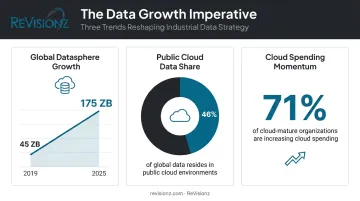
- IDC projects the global datasphere will grow from 45 zettabytes in 2019 to 175 zettabytes by 2025, with 46% of that data expected to live in public cloud environments (IDC/Seagate, 2020)
- HashiCorp's 2024 survey of nearly 1,200 technology decision-makers found 71% of cloud-mature organizations increased cloud spending in the past year (HashiCorp, 2024)
- Mergers, acquisitions, and system modernization projects are pushing more companies to consolidate data that was never designed to live together
Data Migration vs. Data Integration vs. Data Conversion
These three terms get tangled together constantly, but they solve different problems:
- Migration moves data from one system to another: the data's home address changes
- Integration combines data from multiple sources into a unified, ongoing view: nothing necessarily relocates
- Conversion changes the format of data, such as converting a proprietary CAD file into a standard exchange format
Conversion is frequently a required sub-step within a migration project, not a separate initiative. You'll almost always need to convert something along the way.
For engineering and process industries, this distinction gets more complicated. "Data" often means far more than database rows, including drawings, tag registers, and maintenance history. That expanded definition adds real complexity to a standard IT migration playbook.
Types of Data Migration
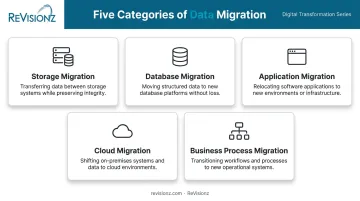
Vendors don't fully agree on a single taxonomy here. Microsoft describes five broad categories, while AWS lists four and treats cloud migration as its own separate topic. What matters more than the exact count is understanding what each type actually involves.
The core types you'll encounter:
- Storage migration: Moving data between storage devices or media, such as shifting from on-prem servers to cloud storage, usually to improve performance or cut infrastructure costs
- Database migration: Transferring data between database management systems, often requiring schema conversion when you're switching vendors or upgrading versions
- Application migration: Moving data to support a new software platform, which means reshaping data to fit the new application's data model
- Cloud migration: Shifting data, workloads, or entire systems from on-premises infrastructure to the cloud, or between cloud providers
- Business process migration: Migrating data tied to a broader transformation like a merger, acquisition, or reorganization
Real-world projects rarely fit neatly into one box. A company migrating to a new ERP after an acquisition is likely running database, application, and business process migration simultaneously. Don't get hung up on categorization. Plan for the overlap instead.
The Data Migration Process: A Step-by-Step Guide
A structured approach is the single biggest factor in reducing migration risk. Here's how it typically breaks down.
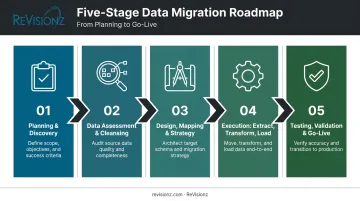
1. Planning & Discovery Define your migration goals, scope, and success criteria upfront. Audit source systems thoroughly, identify every stakeholder who touches the data, and flag compliance requirements before you write a single line of transformation logic.
2. Data Assessment & Cleansing Profile your data quality before you move anything. Remove duplicates, fix inconsistencies, and set data standards. This step alone prevents most downstream headaches. Migrating dirty data just gives you dirty data somewhere new.
3. Design, Mapping & Strategy Selection Map source fields to your target system's structure and decide on your migration approach.
Choosing a Migration Strategy: Big Bang vs. Trickle
| Strategy | How it works | Trade-offs |
|---|---|---|
| Big bang | All data moves within a set window | Faster, simpler, less costly upfront, but requires downtime and carries higher risk if something breaks mid-transfer |
| Trickle | Data moves incrementally while old and new systems run in parallel | Lower risk and less downtime, but more complex to manage and typically takes longer |
There's no universal "right" answer. Your acceptable downtime window and system complexity should drive the decision, not a preference for speed.
4. Execution (Extract, Transform, Load) Pull data from the source system, transform it to match target requirements, then load it into the new environment. This is where most of the technical heavy lifting happens.
5. Testing, Validation & Go-Live Run integrity checks and reconciliation tests against the full data volume, not a small sample. Confirm accuracy in the new system, then cut over and decommission legacy systems, but only once you're confident in the results.
This sequence, refined through ReVisionz's two decades of large-scale asset data migrations, is what separates a smooth cutover from a stalled one.
Common Challenges & Best Practices
Common Challenges to Anticipate
Even well-planned migrations hit friction points:
- Data quality issues: Duplicates, missing values, and outdated records introduce errors into the new system. Experian data shows 44% of organizations faced migration delays from data-quality problems (EDQ, 2017)
- Compatibility and schema mismatches between source and target systems that complicate field mapping
- Downtime and business disruption risk, especially for mission-critical systems that can't tolerate extended outages
The same Experian research found 51% of respondents said better communication would have reduced delays, while 29% cited insufficient staffing as a major obstacle. Those numbers point to planning gaps, not technical failures.
Best Practices to Reduce Risk
- Back up everything and build a documented rollback plan before migration begins, and assume something will go wrong, because it usually does
- Engage stakeholders early and keep clear documentation of decisions, mappings, and lessons learned throughout the project
- Test thoroughly in a staging environment that mirrors production before you touch live data
Skipping the staging step to save time remains one of the most common, and costliest, mistakes teams make.
Data Migration for Engineering & Asset-Intensive Industries
Standard IT migration guidance assumes your data lives in rows and columns. In engineering and asset-intensive industries, it doesn't. You're dealing with P&ID drawings, 3D models, equipment tag data, and decades of maintenance history, often scattered across formats that were never designed to talk to each other.
That volume and format diversity, combined with interdependencies between systems, makes these migrations far more complex than a typical database move.
Poor data quality in asset-heavy environments can compromise safety and regulatory compliance, not just system performance. The business risk goes well beyond IT uptime, as two independent studies show:
- NIST estimates inadequate data interoperability costs the U.S. capital-facilities industry $15.8 billion annually, with owners and operators absorbing more than $10.6 billion through manual re-entry, archive searches, and operational delays (NIST, 2004).
- A peer-reviewed Applied Energy study found faulty age data alone can shift equipment replacement timelines by up to 10 years, producing an average simulated cost of $11,680 per line across a portfolio of overhead lines (Applied Energy, 2021).
Bad data doesn't just cause inconvenience. It changes maintenance decisions.
This is the gap ReVisionz was built to close. As a digital asset transformation consultancy working exclusively with capital-intensive industries, we've spent over two decades developing data migration and enrichment methodologies specifically for engineering and operational data — not generic IT records.
Our recently launched Main Information Contractor+ (MIC+) service applies AI to help owner-operators turn migrated engineering data into lifecycle-ready information their teams can actually use, from commissioning through decommissioning.
Frequently Asked Questions
What is data migration?
Data migration is the process of moving data between storage systems, formats, or computing environments while preserving its accuracy and usability. It requires planning and validation, not just a simple transfer.
What are the four types of data migration?
The four core types are storage, database, application, and cloud migration. Business process migration is frequently included as a related fifth category, particularly during mergers or reorganizations.
What is data migration in ETL?
ETL (Extract, Transform, Load) is the technical framework most migrations follow. Data gets extracted from the source system, transformed to match the target's structure, then loaded into its new home.
Which tool is best for data migration?
It depends on your data volume, complexity, and destination. Simple jobs might use custom scripts, while complex, high-stakes migrations call for enterprise cloud-native platforms or specialist consultants like ReVisionz.
What is the difference between data migration and data conversion?
Migration moves data to a new location or system, while conversion changes its format. Conversion is often a required step that happens within a larger migration project, not a standalone initiative.
How long does a data migration project take?
Timelines vary widely based on data volume, system complexity, and your chosen strategy. Small projects might take days, while enterprise-scale migrations can stretch across several months.