TagIQ by ReVisionz

Stop managing tags in spreadsheets.

One live tag register for the whole project team: naming rules it enforces, a reason behind every change, drawings and models that know their tags, and an AI agent that answers from the register and proposes changes a person approves. Part of the ReVisionz AI suite for industrial projects.

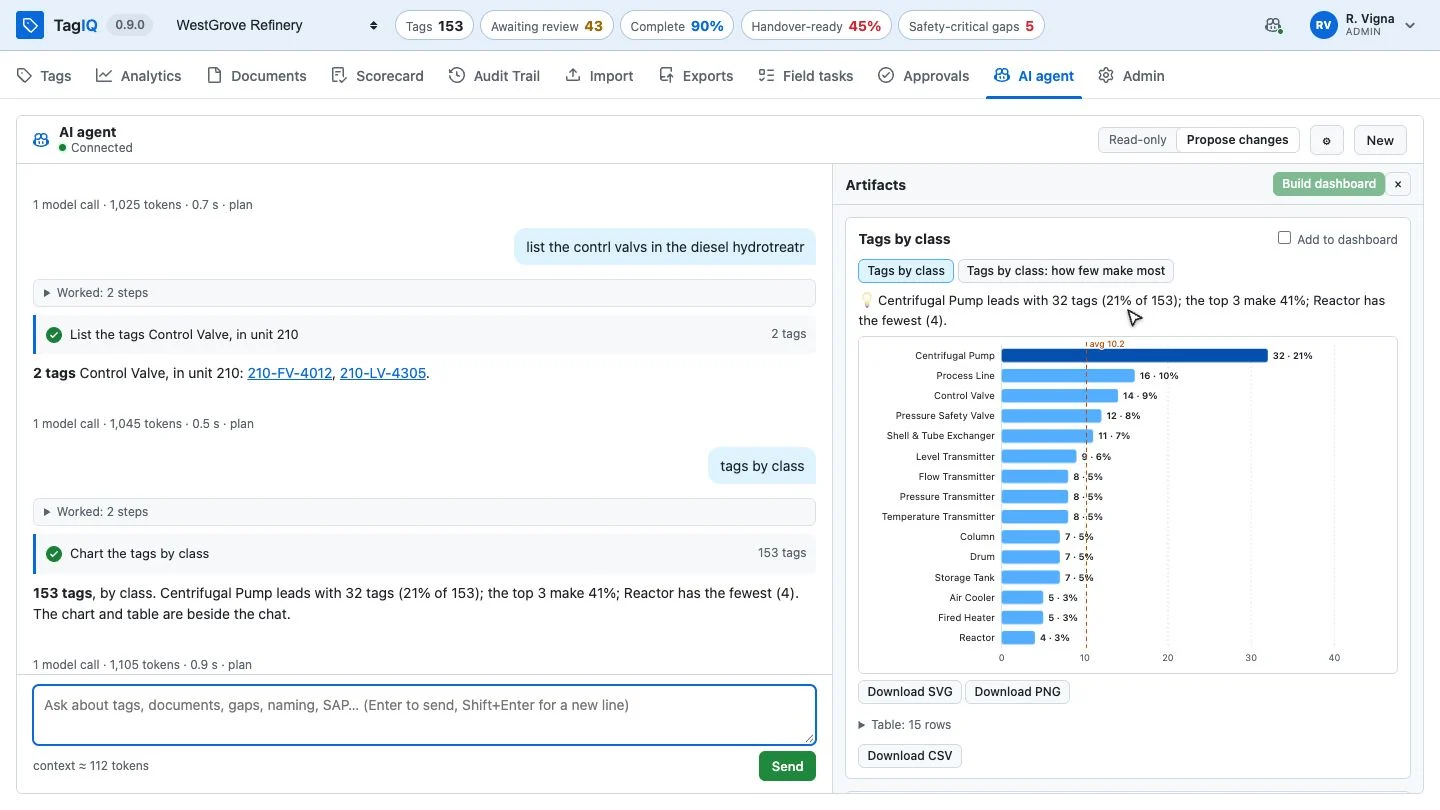
The TagIQ AI agent with its plan and a report beside the chat
The AI agent, working on live project data
Why TagIQ

Is your tag register an asset, or a liability you inherit at handover?

Don't let the tag register hold the project back

TagIQ turns the register from a spreadsheet nobody trusts into the source of truth everyone works from, from the design office to the field.

Reduce rework
Data is checked as it arrives, and the gaps are named, so problems are fixed before procurement and construction meet them.
Hand over with confidence
Know which tags are ready, approved, complete and documented, and what stands between the rest and handover.
Improve safety
Safety-critical equipment with missing data is surfaced first, wherever you look in the register.
Trust every change
Every change carries who, when and why, can be undone, and is approved by a person, the AI's included.
The problem

Sound familiar?

Your tag register is costing you time you don't have

On every EPC, oil & gas and process plant project, the same problems recur, and the cost shows up in procurement delays, commissioning rework and handover disputes.

How much of the last delivery could you actually use?
Incomplete on arrival
Registers arrive missing what each class of equipment needs: manufacturers, ratings, fail actions, relief cases. Every gap is a delay downstream.
How many records will the maintenance system bounce this time, and why?
Refused downstream
The maintenance system rejects records that break its rules: numbers it cannot accept, descriptions too long, items it cannot classify. Each one waits for someone to find and fix it.
Which copy of the register is the current one?
Too many "masters"
Shared spreadsheets, overwritten rows, emailed copies. Nobody can say which version is current, or who changed what, or why.
Why does every handover still start with an export?
Disconnected
The register doesn't talk to the drawings, the models or the maintenance system. Every handover is a manual export, remap and error-check.
TagIQ

How many spreadsheets does it take to answer one question about one tag?

Everything your team needs, in one register

A single web application that the whole project team, from project manager to field technician, uses as the source of truth for every tag, every day.

A structured register
Each tag carries its class's form: typed attributes, units of measure, picklists, the required ones flagged. Naming rules per class, a register per project, and changes that appear on every screen as they happen.
An AI agent
It works the register with real tools, in steps you can see: it answers, plans, reports and builds dashboards. Every change it wants is a proposal a person approves.
An audit trail you can undo
Every save asks why and may carry an MOC or DCN reference: who, when, why, every value before and after, whoever made it. Any change can be taken back.
Imports, checked first
Tags, documents, links and files from spreadsheets or a supplier's API. Every row is checked through the real write before anything is committed, and a run can be undone in one step.
Drawings and models
P&IDs and 3D models that find the register's tags. Pick one and its details open beside it; mark up a drawing and the redline is kept with the revision.
Connected
Approved tags delivered to the systems that run the plant, each in the fields it expects and every answer kept; buttons that act on other systems from a tag; QR labels on the equipment; and a documented API.
Analytics & quality

How long does it take today to answer “how far along are we?”

Always know where your project stands

Live dashboards of figures, charts, tables and pages, updated the moment anyone writes. No report to run, no export needed.
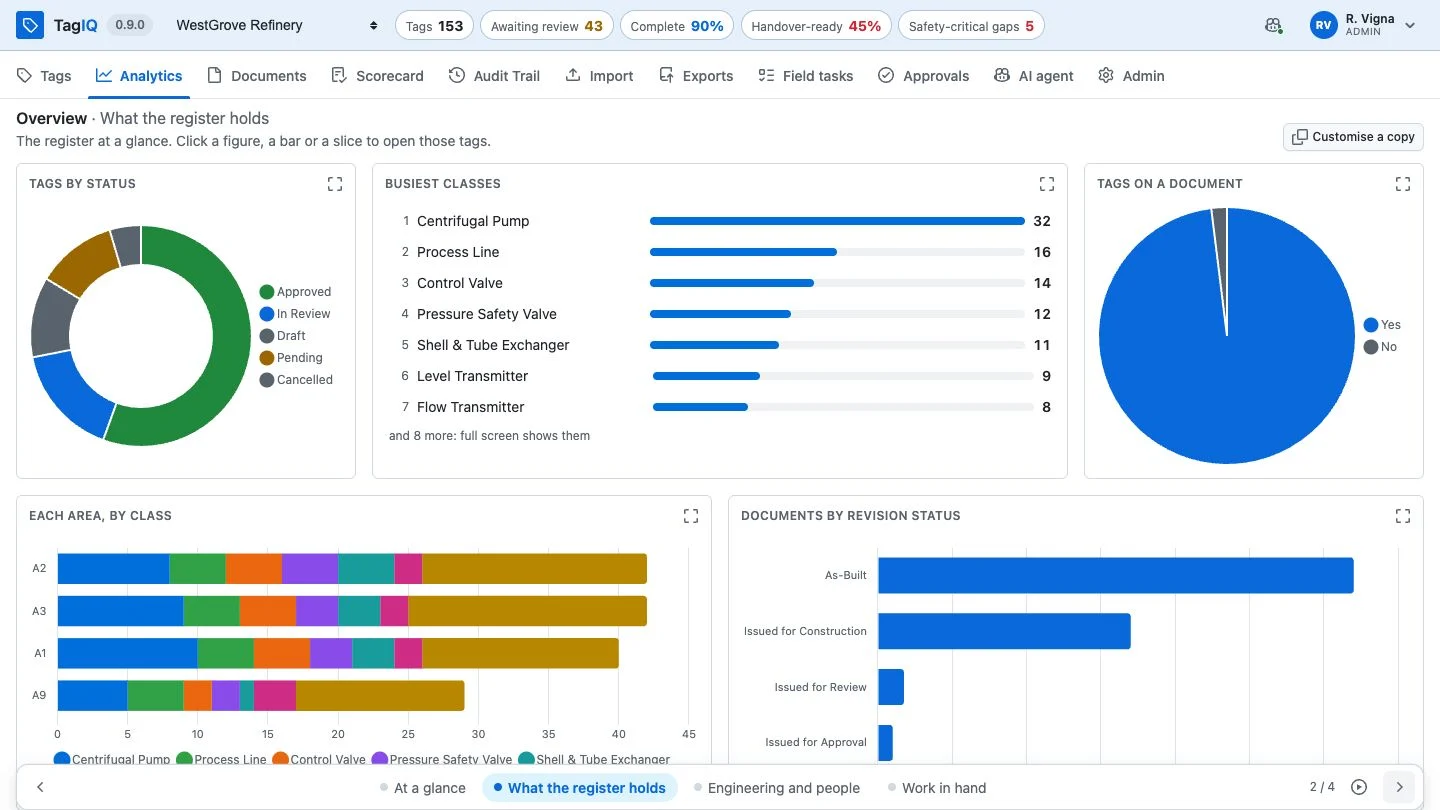
A TagIQ dashboard page of charts: tags by status, busiest classes, each area by class
What the register holds: every bar and slice opens the tags it counts
Click through to the tags
Every figure, bar, slice and row opens the register at exactly that filter.
Charts, grids and pages
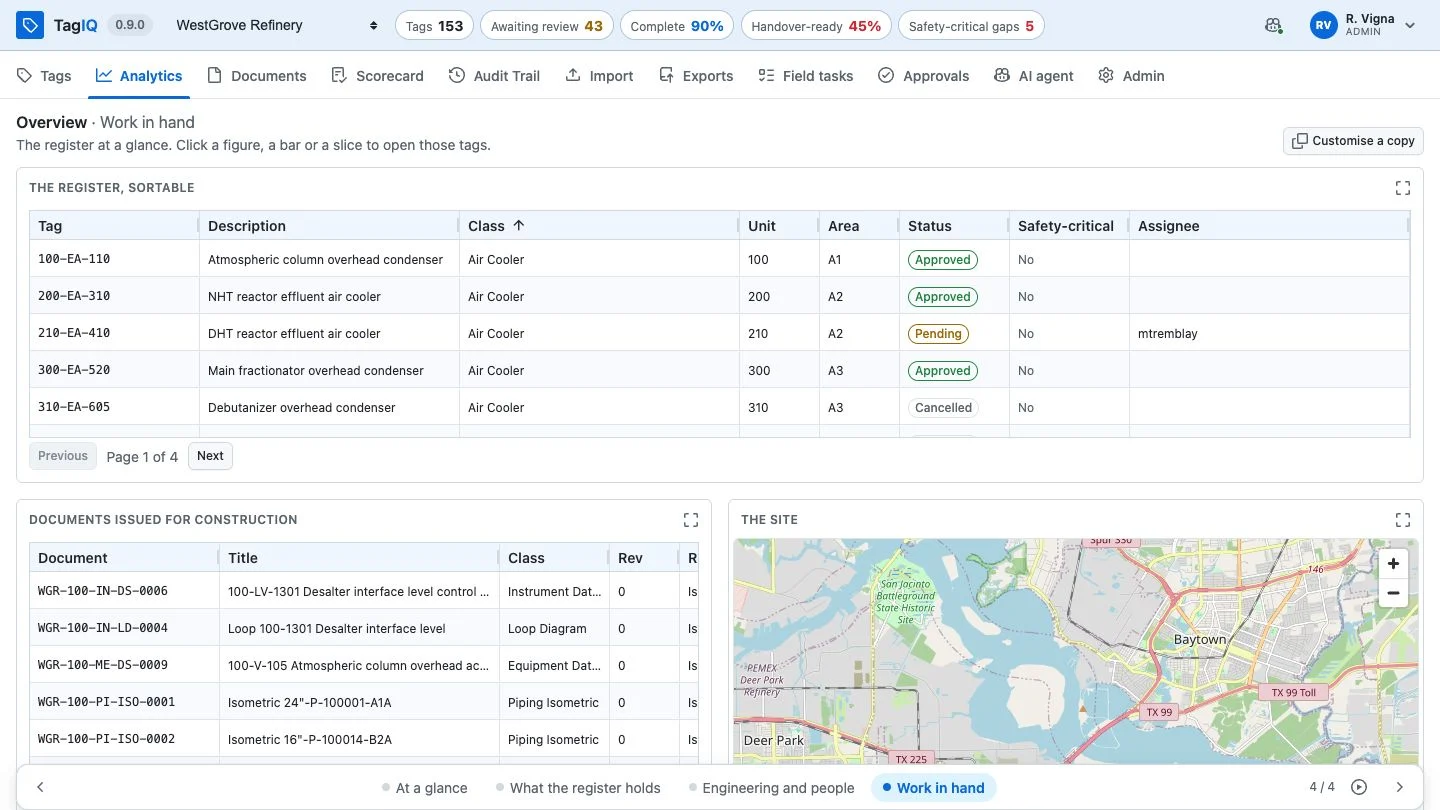
Counters, charts, top lists, sortable data grids, and other pages framed beside them: a map, a historian trend, a report.
Yours to shape
Build your own, share them, play them on a wall screen, or ask the AI agent to build one.
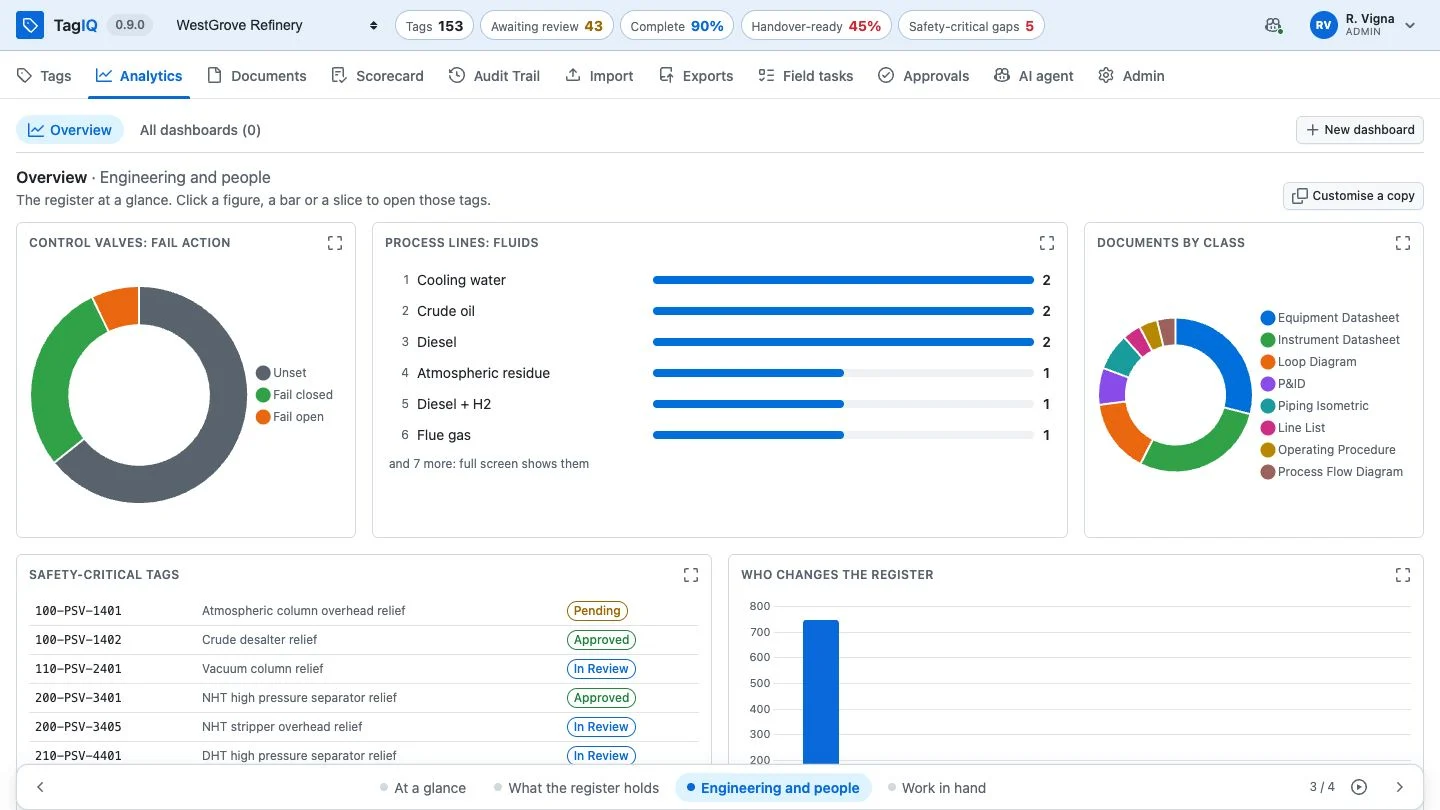
A dashboard page read from the tags' engineering attributes
Read from the engineering itself: fail actions, fluids, documents by class
A dashboard page with a data grid and an embedded map
Work in hand: a sortable data grid beside an embedded map of the site
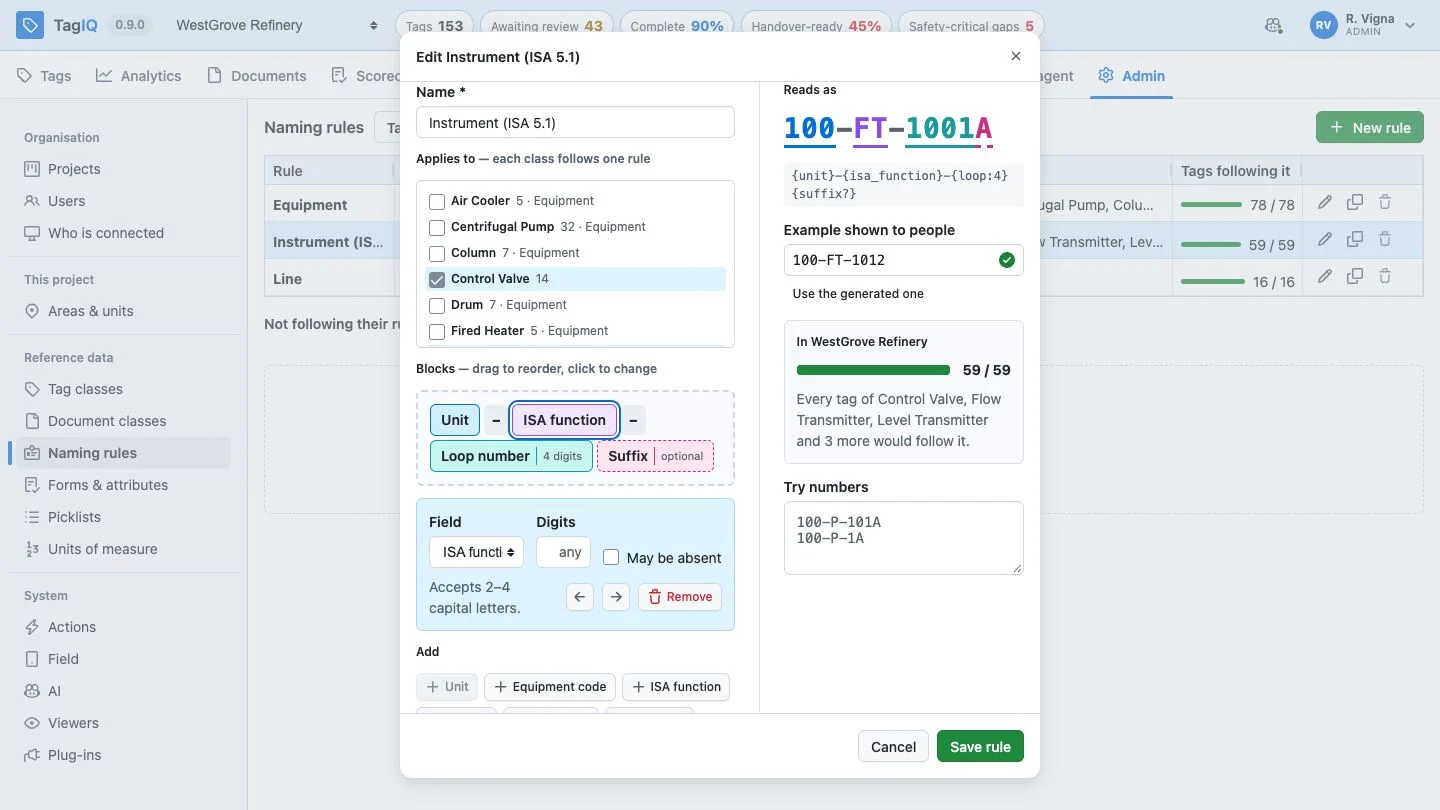
A naming rule built from blocks, with its example and the register's fit
A rule built from blocks: the number it reads as, and how much of the register follows it
Why TagIQ is different

When a tag is renamed, what is still pointing at the old number?

Engineering judgment, encoded

Any tool can store a list of tags. TagIQ is shaped by ReVisionz's decades of tag management on EPC and oil & gas projects.

01
Numbers have a grammar
Each class follows its rule, equipment and instruments alike (ISA 5.1). New tags and renames must follow it, and the register shows how much of it does.
02
Safety-critical comes first
Safety-critical equipment with gaps is counted on its own and put at the top of the worklist, then a person releases the fix.
03
Renaming never breaks things
Every rename keeps the number it replaces as an alias, so drawings, models, imports and search still find the tag.
The AI agent

What would you ask your register, if it could answer?

One AI agent, everywhere you work

The agent has a tab of its own and works inside the screens you already use: the search box, the import, Analytics. No separate platform and no prompt engineering for your team.

Ask in words
Answers from the register, in steps you can open
It looks things up with real tools and shows each step. Every figure in an answer comes from one of them.
By value, not only by field
"Control valves that fail open"
It reads attribute values as well as fields, so it finds the tags no column shows. The answer is the tags themselves.
Search box
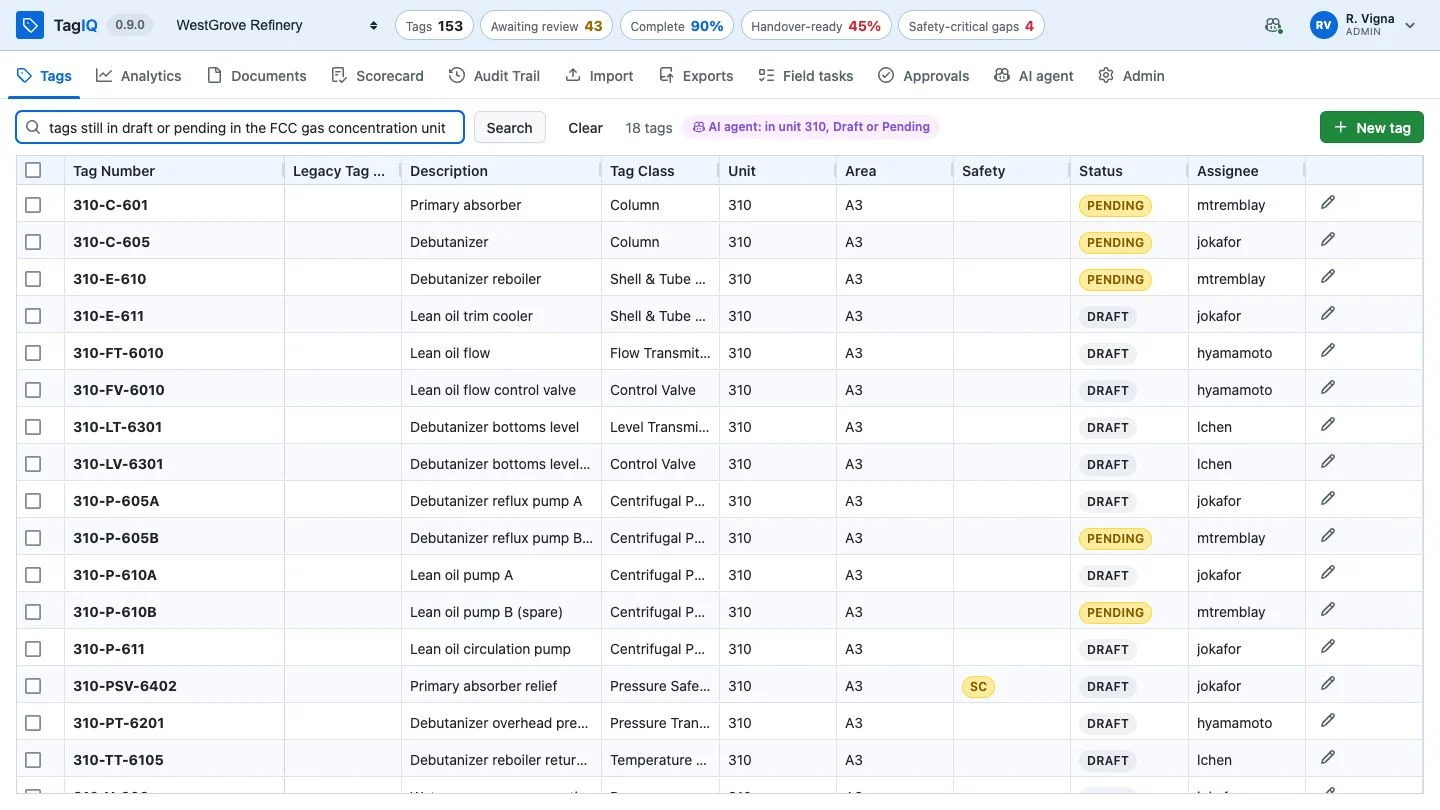
Plain words in, an exact filter out
Type a question in the Tags search box: the agent reads it as a filter and says how it read it. No query language to learn.
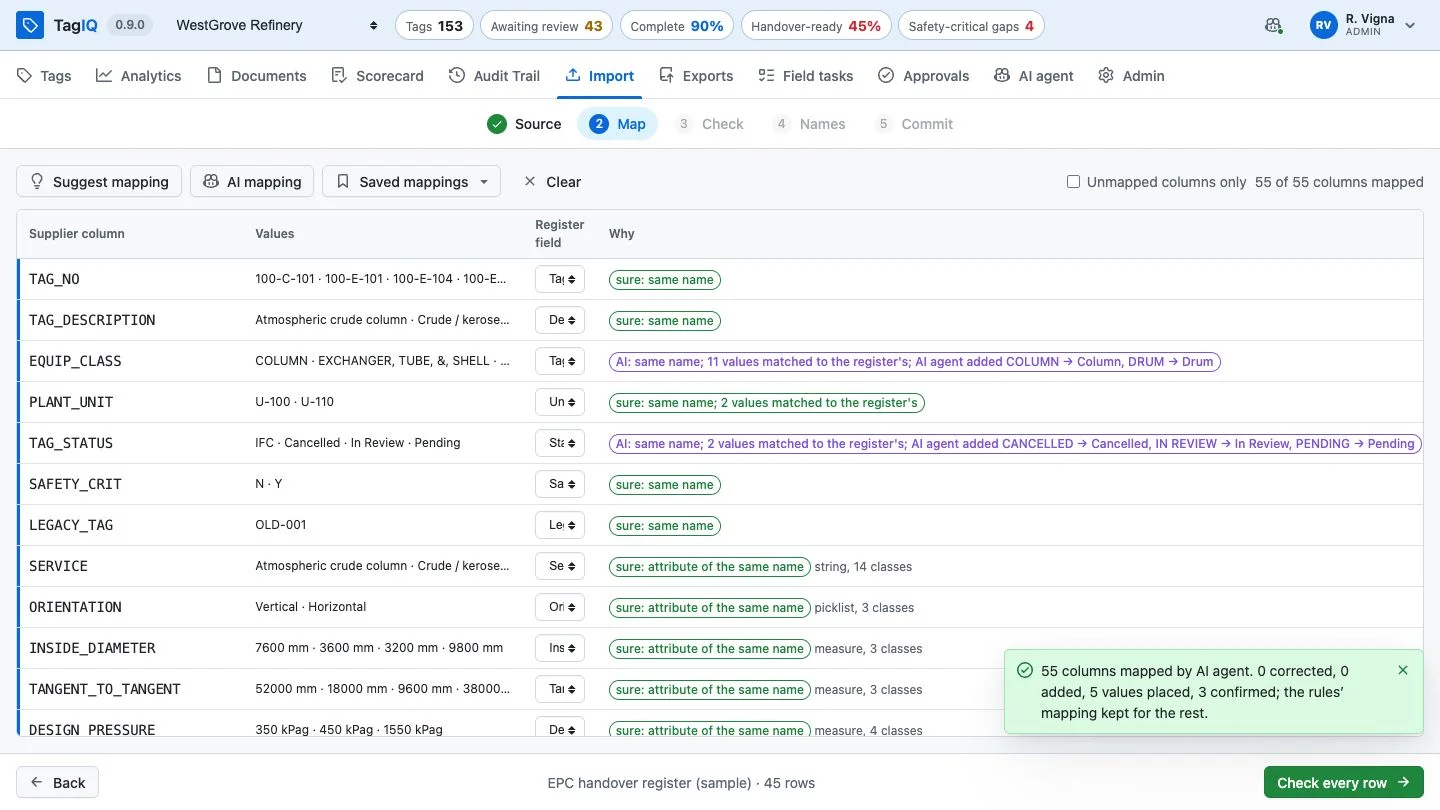
AI mapping
A supplier's file, mapped by its values
It reads every column's values and builds on the rules' mapping: confirms, corrects and adds. Each change says why.
Reports and plans
Bigger work, shown as it goes
It shows its plan and ticks it off, and puts reports and tables beside the chat, ready to download.
Dashboards on request
Describe it, and it is built
Describe the dashboard a team needs; the agent builds it from live data, and it is yours to keep, share or change.
The maintenance system's refusals
Read as written, never guessed
It reads why records were refused and which tags they concern, then proposes the fixes for exactly those.
It remembers
The project's conventions, kept
Tell it once how the project works or how you like answers, and it keeps that. Its notes are listed, and can be forgotten.
Proposals, not writes
The agent cannot change the register. A change it wants is shown before → after and waits for a person; the record names who approved it and that the agent proposed it, and it can be undone.
Granted, not assumed
The agent runs as a plug-in. It reaches the register only through TagIQ, with the permissions an administrator grants; the model key stays on your server, and AI can be switched off.
The AI agent: control

Would you let an AI change your register without asking?

You decide what it may do

There is no autonomous mode, by design: the agent proposes and a person decides.
01
Read-only
It looks, answers and reports, and proposes nothing; asked for a change, it says what it would change and why.
02
Propose changes
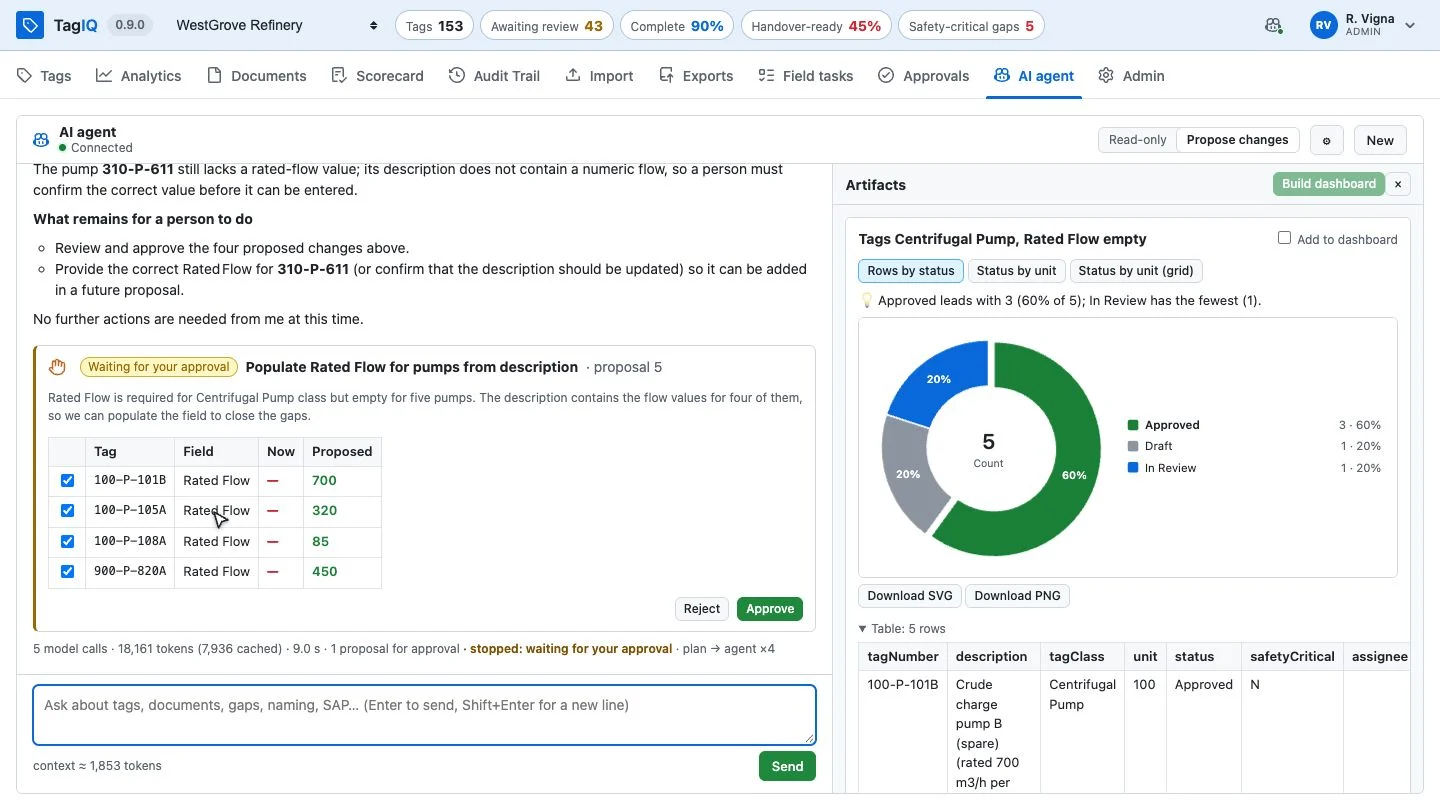
Each change is a card, before → after. Approve it in TagIQ, or reject it and nothing happens.
03
Granted by an administrator
What the agent may reach is chosen permission by permission: reading the register, filing proposals, making dashboards.
A proposal from the AI agent, before and after
A proposal from the agent, before → after, waiting for a person
The agent at work

Your project data, answers included

The agent doesn't read your register into a prompt: it queries it, the way you would, through TagIQ. Its answers are the rows it actually got, whatever the size of the register.
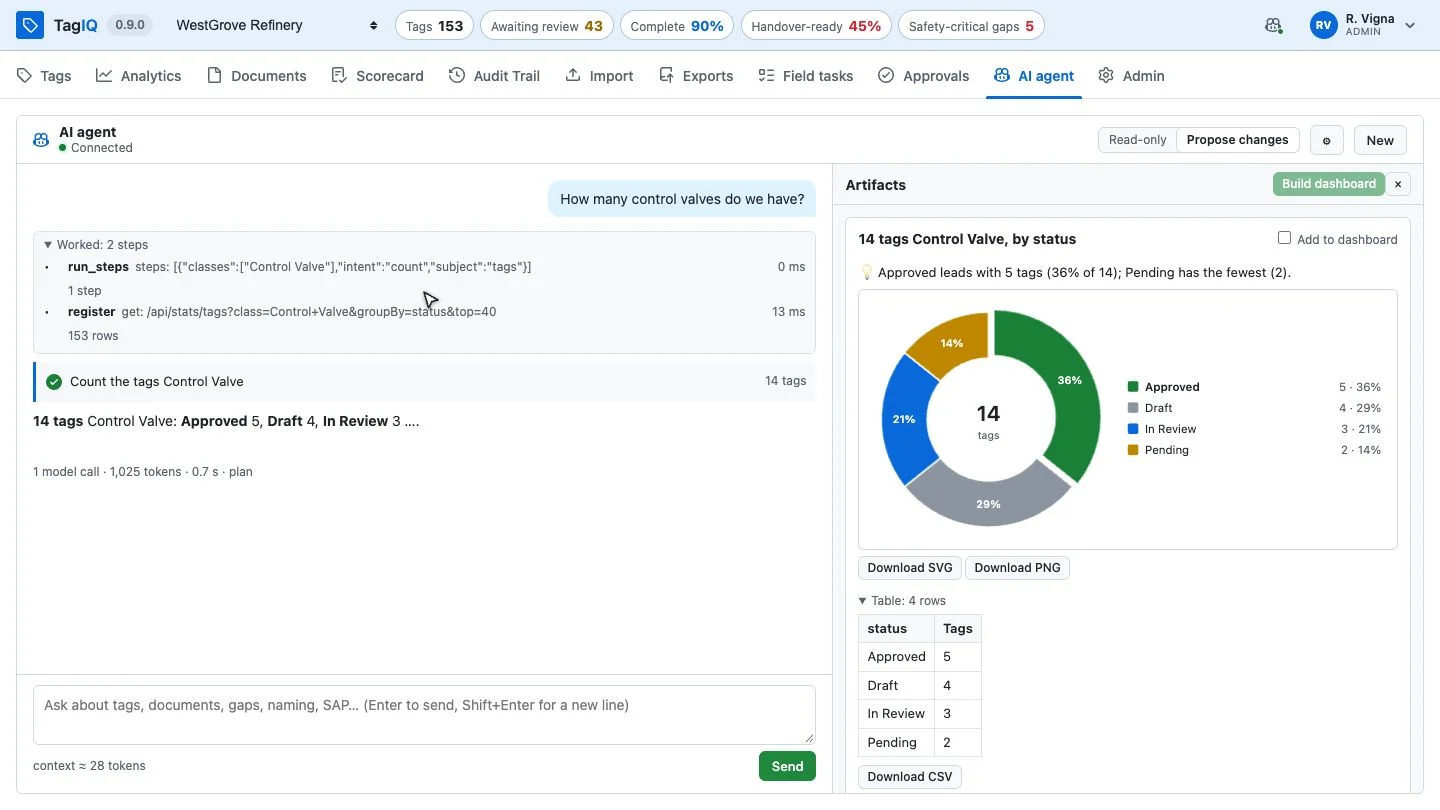
Steps you can open
Each answer lists the tools it used and what it asked them.
Worklists, not just counts
"Which safety-critical tags have gaps, and what is missing?" names the tags and the attributes.
Builds on the conversation
Follow up naturally without restating the context.
The AI agent's answer with its steps open
The steps behind an answer
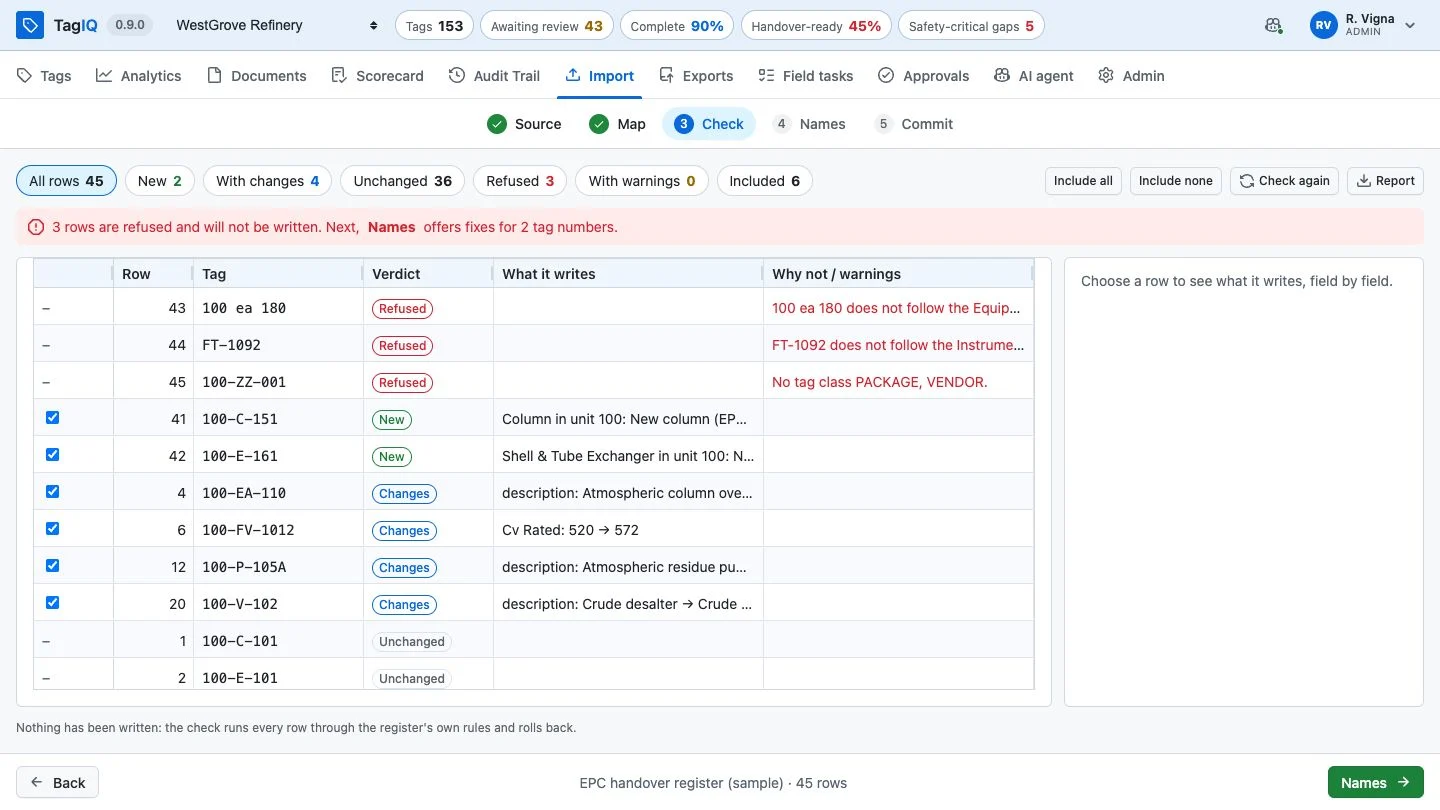
The import's check step
Every row checked through the real write before anything is committed
Import

How long does checking the next supplier delivery take, before anyone can trust it?

From a supplier's file to the register, in five steps

01
Source
A spreadsheet, a JSON file or a supplier's API: tags, documents with revisions, or links.
02
Map
Each column to the register, by name and by value; the AI agent builds on it. Mappings are saved for the next delivery.
03
Check
What would be new, what would change and what would be refused, and why. Nothing is written.
04
Names
Numbers that break the naming rules, each with a suggested fix; the supplied number stays as an alias.
05
Commit
One change, with a reason, undone in one step if needed.
Integration

Bring your data in. Connect to everything else.

Files and APIs in
Spreadsheets, JSON files or a supplier's API, documents and their files in bulk, each matched to its revision by name.
Deliveries out
Approved tags delivered to the systems downstream: maintenance, an EDMS, a data hub. Choose the fields, name them as the receiver expects, and keep every request and reply; only the refused go again once fixed. SAP PM comes ready.
Actions, API and plug-ins
Buttons that open another system at a tag or call one, a documented REST API with client kits, and an open protocol for viewers and agents.
A supplier's values, read as the register's
CV
Control Valve
U-100
Unit 100
100 ea 180
100-EA-180, by the naming rule
7600 mm
a measure, in its unit
The import's AI mapping
AI mapping: every column placed, each suggestion with its reason
Readiness

If handover were tomorrow, which tags would hold it up?

Not "is it complete?" Which tags, and what's missing.

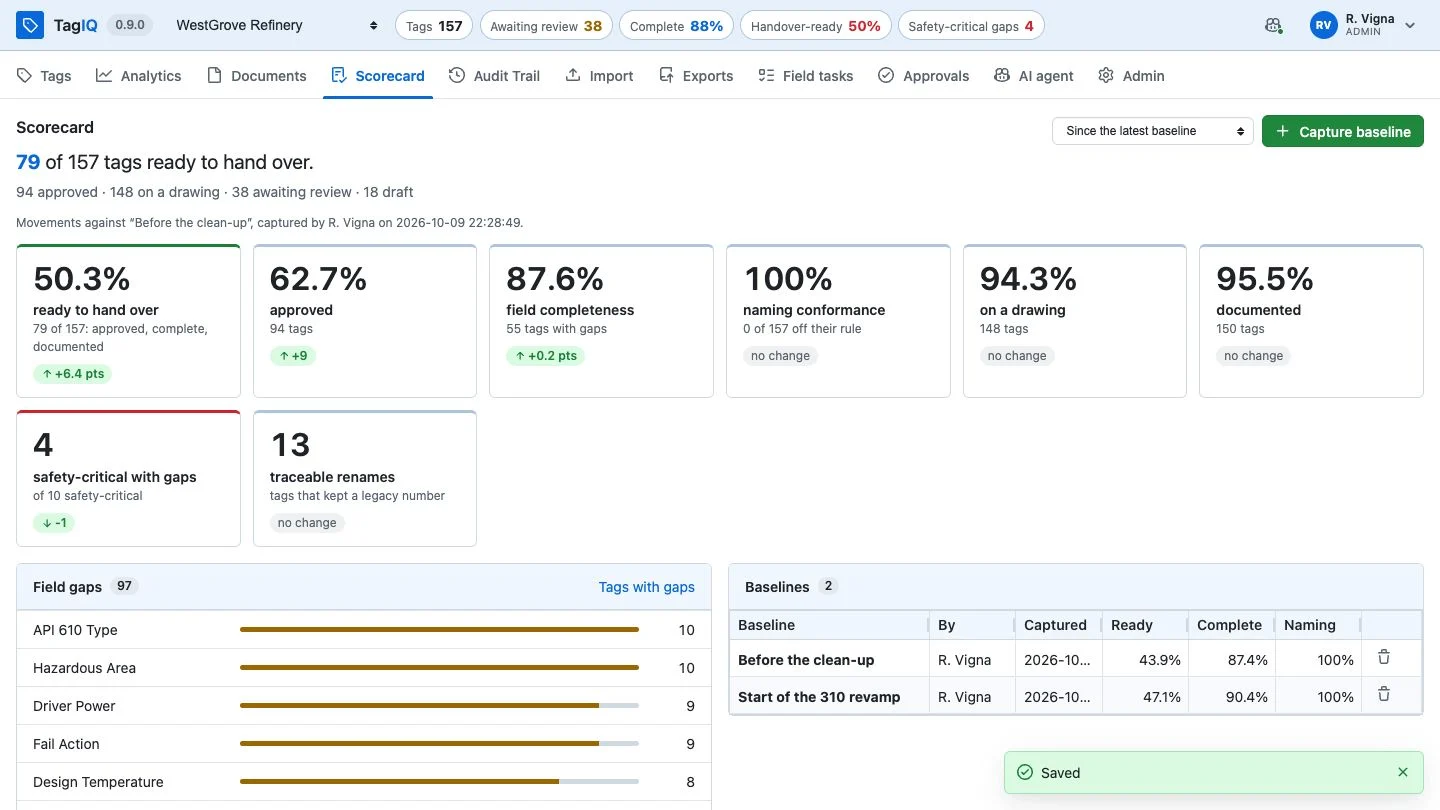
A completeness percentage says there is a problem; it doesn't tell anyone what to do on Monday. TagIQ shows what stands between each tag and handover.
01
Ready means all three
Approved, complete for its class, and on a current document: the scorecard counts the whole sentence.
02
Gaps, most-missed first
The required attributes still empty, each a link to the tags that miss it.
03
Measured, not asserted
Capture a baseline before the work; afterwards every figure reads as a movement against it.
04
Questions for the field
What only the person at the equipment knows becomes a field task; the answer lands on the record.
The TagIQ scorecard
The scorecard after a clean-up: every tile a movement against the baseline
Drawings & models

How long does it take to find one tag on an A1 P&ID?

The register knows where every tag lives

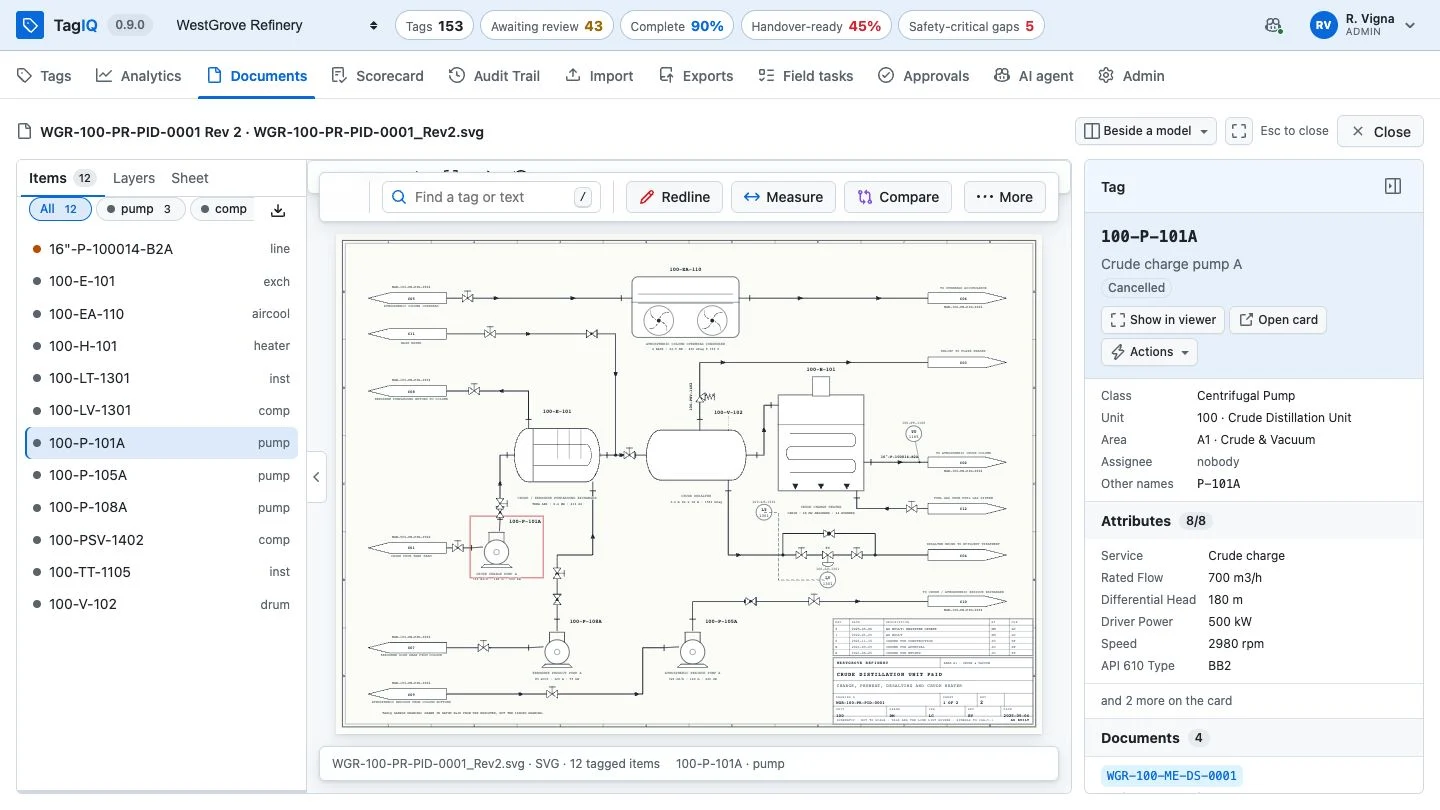
A tag record is only half the story. The other half is the P&ID it appears on and the unit it stands in. TagIQ opens both, and they know the register.
Every tag on the sheet is live
The 2D viewer finds the register's tags on a drawing, by any of their names. Pick one and its status, class, values and documents open beside the sheet.
Redlines kept with the revision
Mark up a drawing and save it with a reason; whoever takes it into the next revision marks it incorporated or rejected.
Models that answer to the register
The 3D viewer opens the common plant model formats in the browser and ties elements to tags, even by a vendor's number.
Bring your own viewer
Viewers are plug-ins that speak an open protocol; an administrator chooses which opens each file type.
A P&ID in the 2D viewer with the tag drawer
A P&ID: the tag picked on the sheet, and what the register says about it
Drawing + model

Does the model show what the P&ID says?

The P&ID and the 3D model, side by side

Pick a tag on the sheet and the model isolates the same equipment and frames it; pick it in the model and the sheet finds it. A bar counts what the two agree on, and what is only on one.
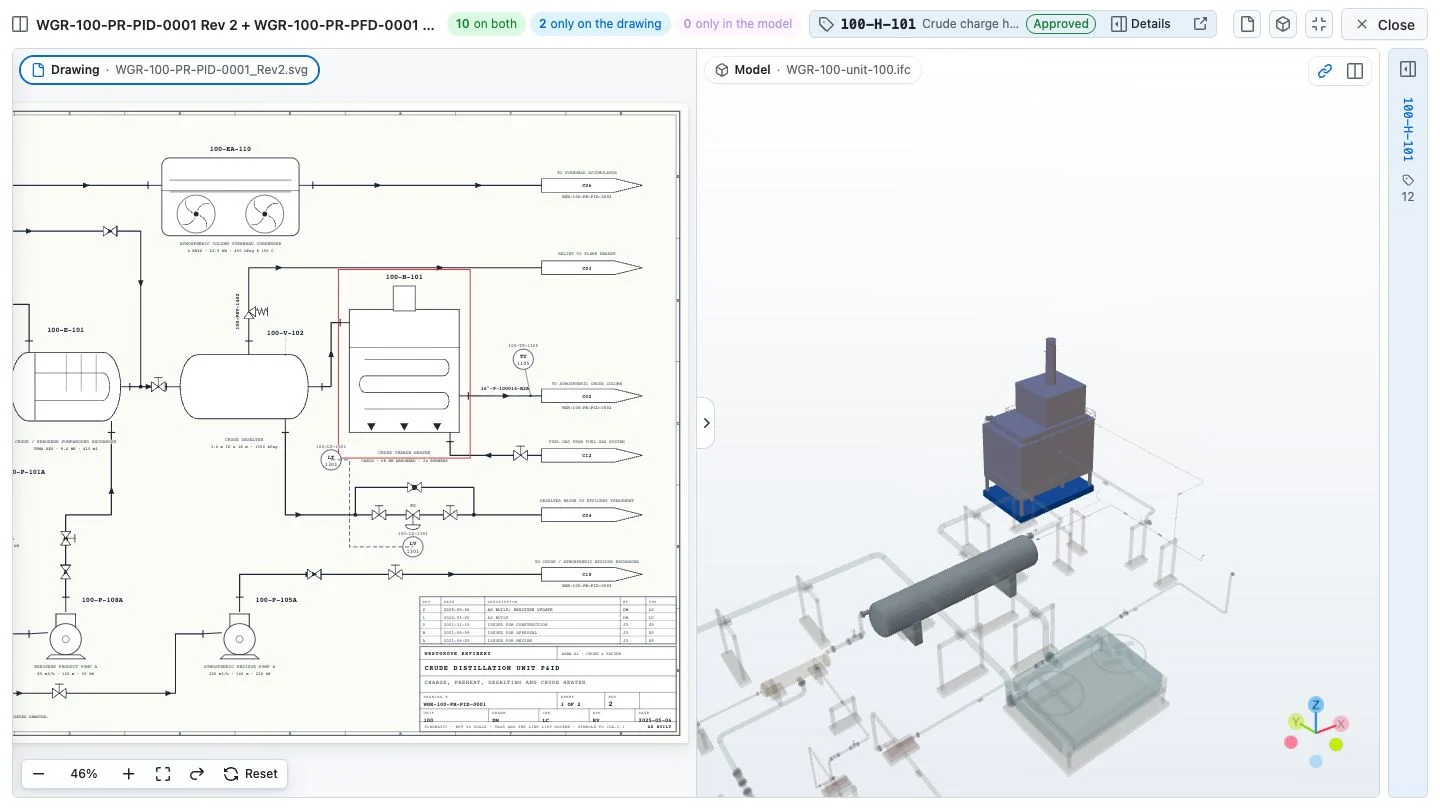
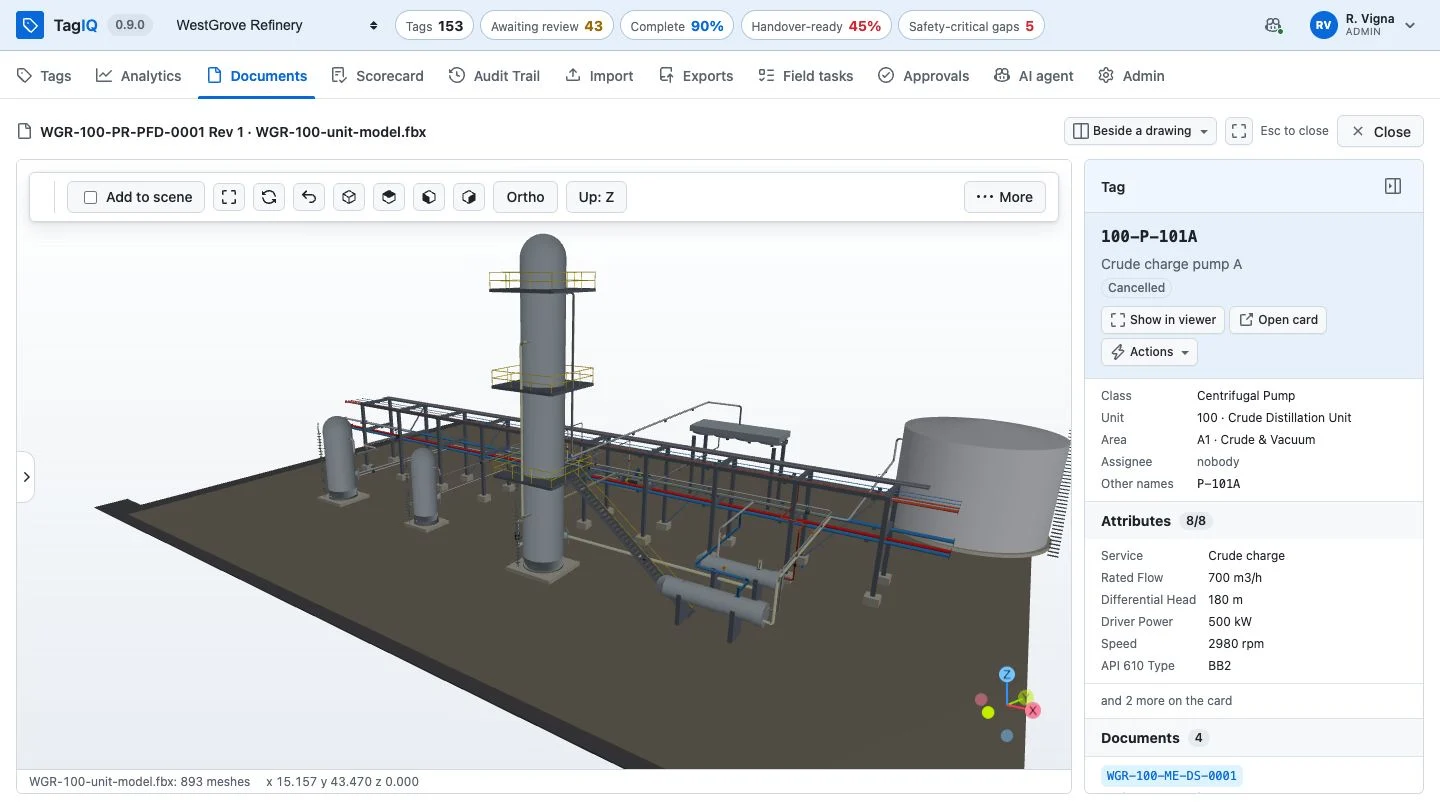
The split viewer: the unit P&ID beside its 3D model, the heater picked on the sheet and framed in the model
The crude charge heater, picked on the P&ID and framed in the model
The unit 100 model in the 3D viewer, a pump picked
The unit model: its elements matched to the register, here by vendor numbers
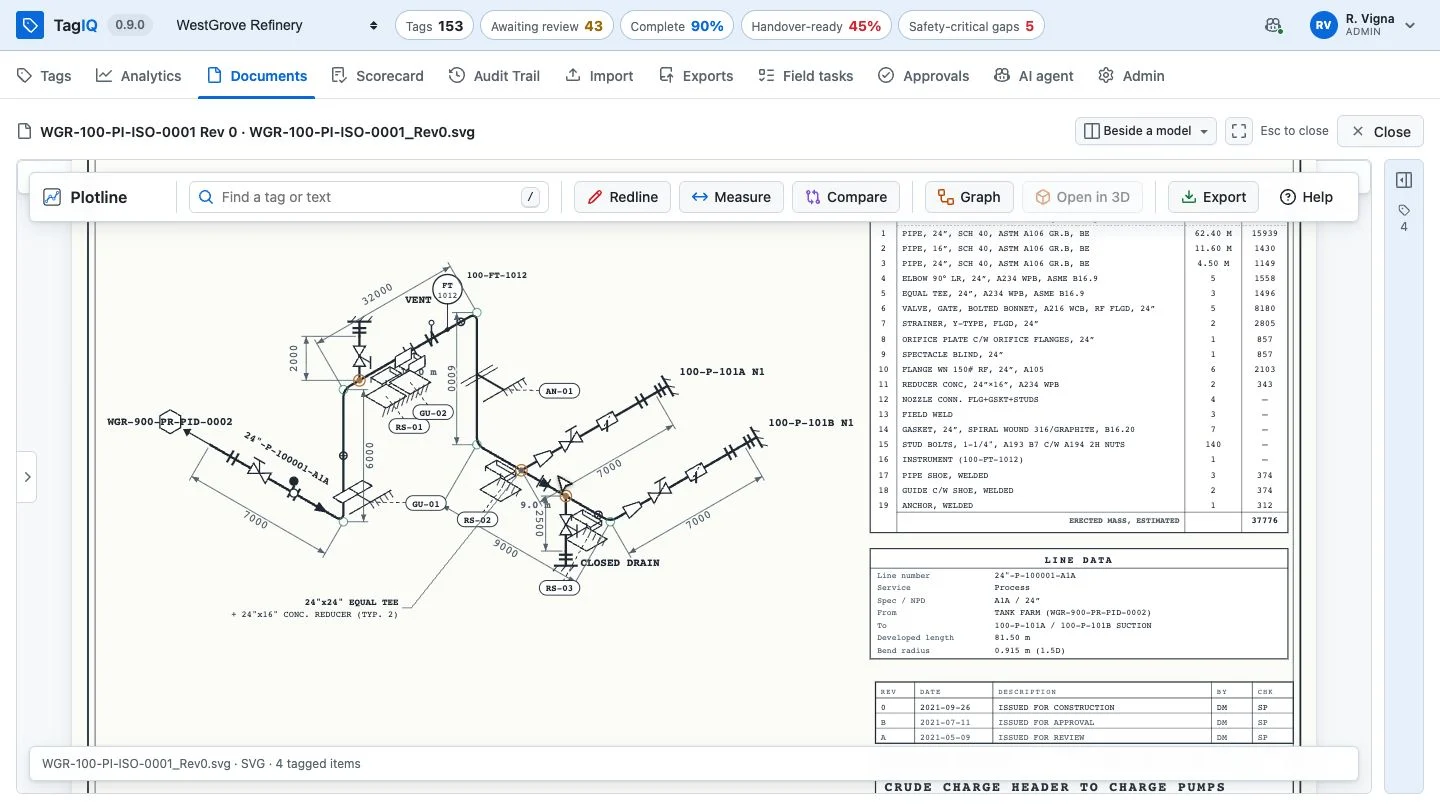
A fabrication isometric in the 2D viewer
A fabrication isometric: the line, its instrument and pumps are register tags

Every screenshot here is taken from the software itself, by TagIQ's own video tutorial, working on a sample register.

Ask for the tutorial, or for a live instance.
Mobile

How does what a technician sees at the equipment get back into the register?

The register goes wherever your team goes

Field technicians, inspectors and site engineers get TagIQ on the phone they carry, laid out for a hand. No app store, no install, no licence per device.
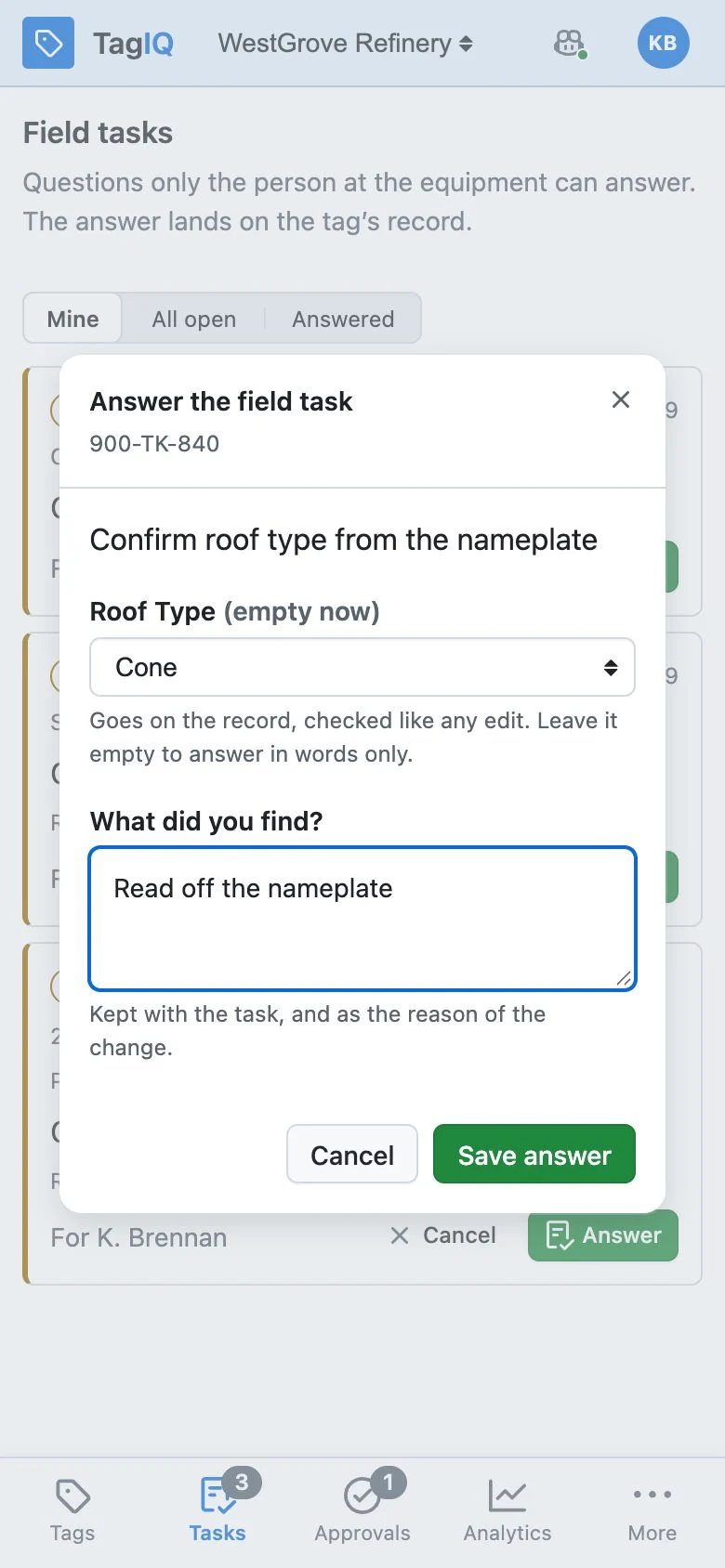
Answering a field task at the equipment, on a phone
Answered at the equipment
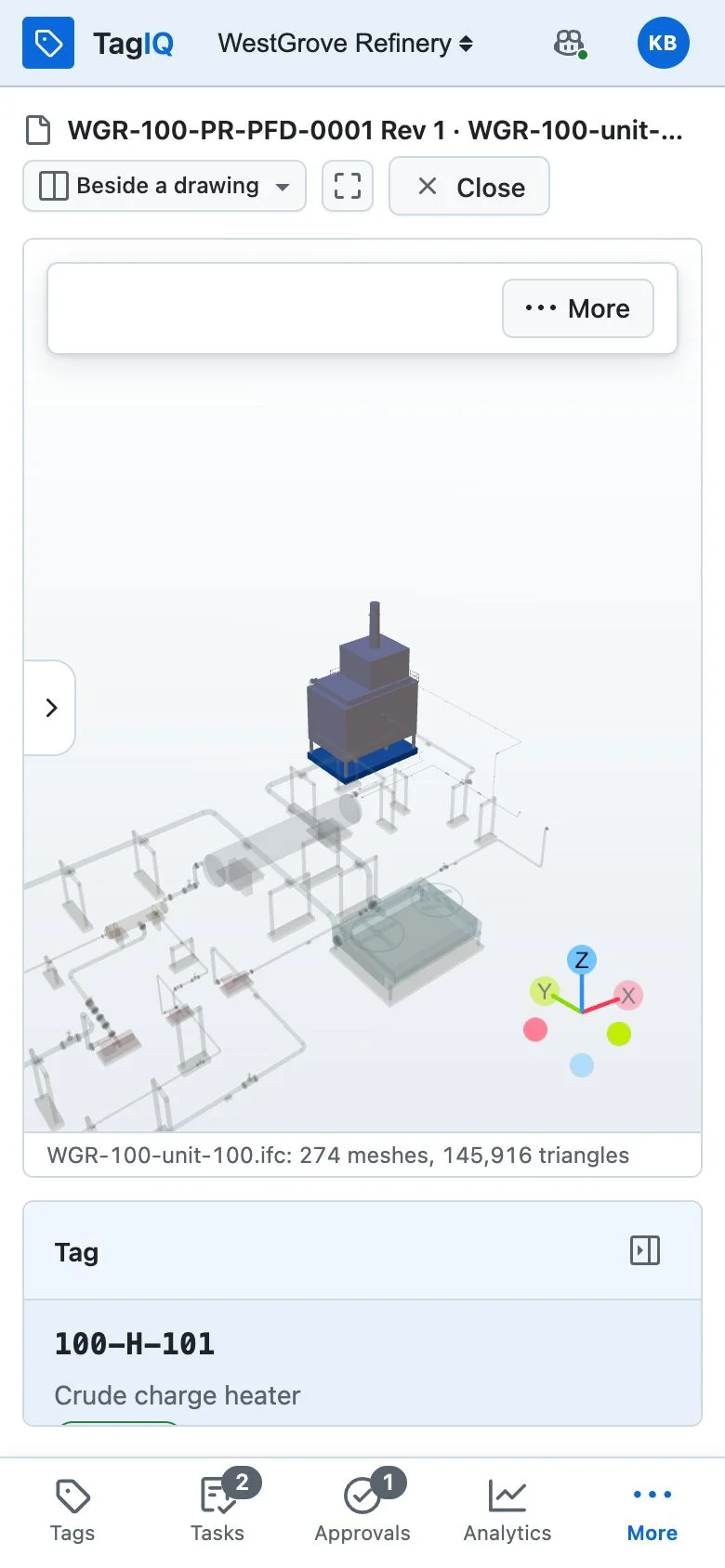
The unit's 3D model on a phone, the tag framed
The 3D model, in a hand
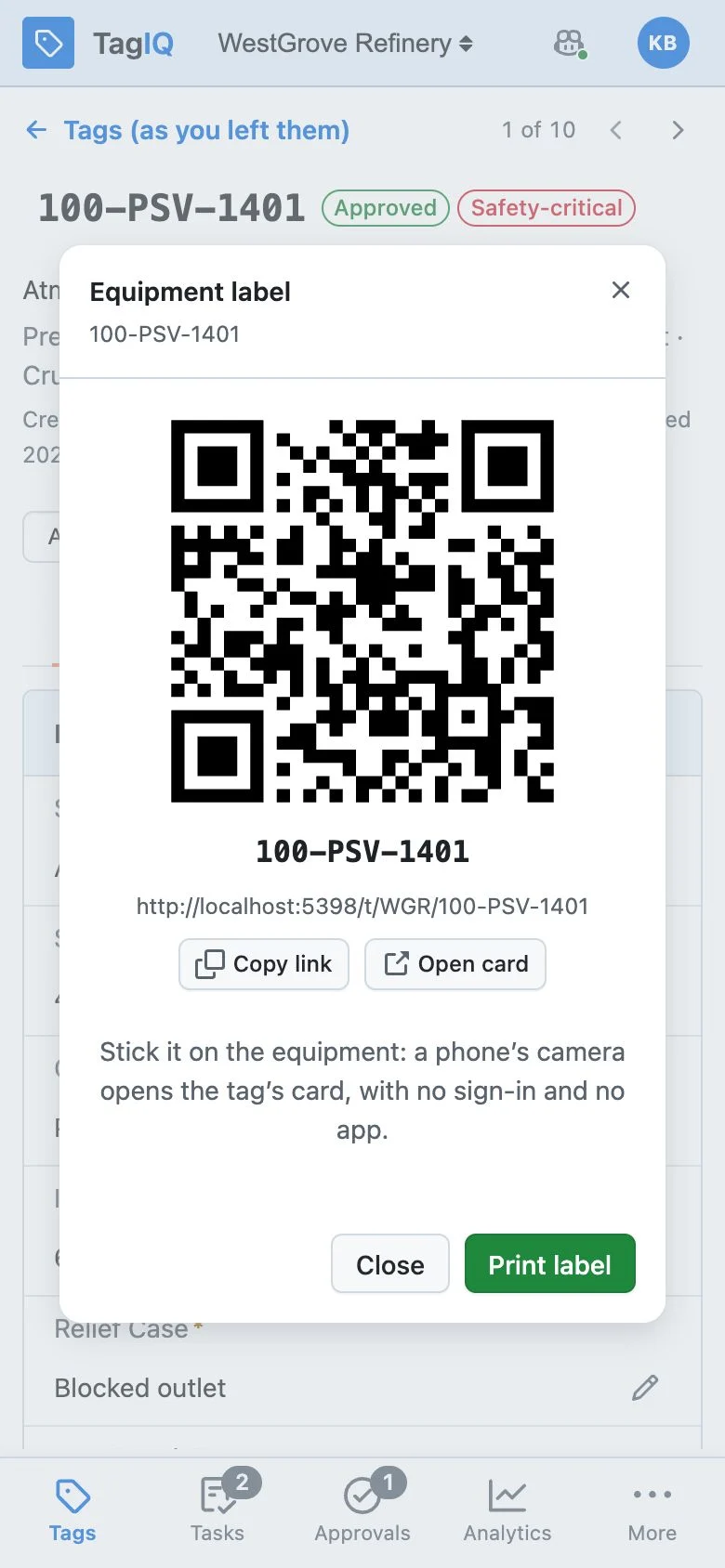
A tag's QR label on a phone
The QR label for the equipment
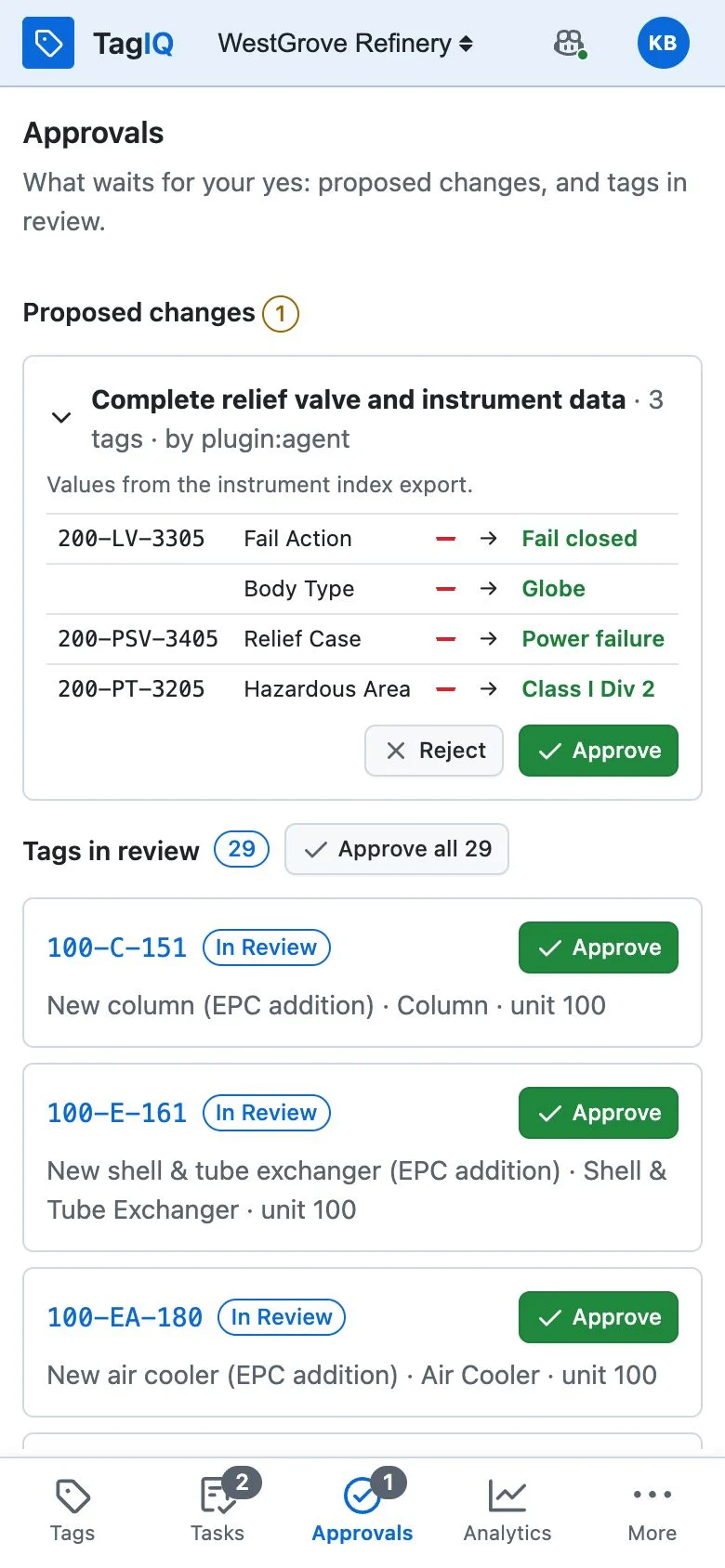
Approvals on a phone
Approve with your thumb
Field tasks, answered at the equipment
Each says what to find out and on which tag; the answer lands on the record.
The register in your pocket
Search in plain words, open a tag and its 3D model, find its actions in one menu.
QR labels on the equipment
A phone's camera opens the tag's card with no sign-in: its description, documents and history.
Approve with your thumb
Proposed changes before → after, and tags in review, approved with a tap and a reason.
Same roles, same audit trail
Access is enforced as on the desktop; a field answer is recorded like any other change.
Real-time
Changes made in the office appear on site as they happen.
Handover

Can you prove the register is ready, or only say so?

Don't take our word for it. Ask the system downstream.

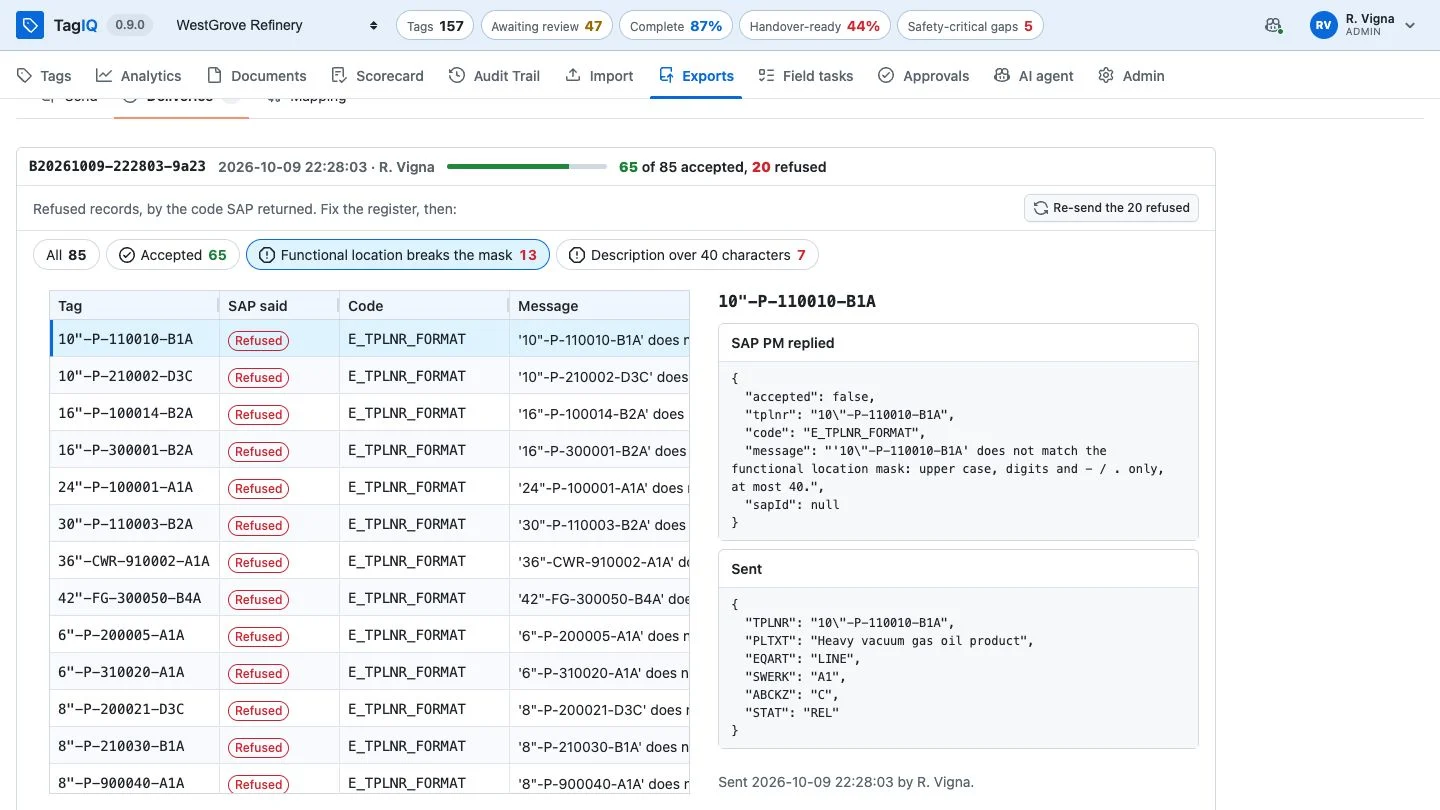
Data quality is easy to assert and hard to prove. TagIQ measures it twice: against a baseline it captures itself, and against the system that has to accept the register.
01
Capture a baseline
Before anyone touches the register: everything after is measured against it.
02
Send it as it is
The maintenance system answers record by record, with its reason for every refusal.
03
Do the work
Fill the gaps, fix the names, approve what was reviewed, with the agent proposing and a person releasing.
04
Send the refused again
Only the records that were refused go back. Every change is attributable: who proposed it, who approved it, when and why.
A delivery to a downstream system with its refusals and reasons
A delivery downstream, here to SAP PM: what it accepted, what it refused, and why
Where it fits

Is your situation a clean new build, or something messier?

One register, shaped to the job in hand

Projects differ, and so do the problems with their data. The same platform takes on each of them, set up for your standards and your systems rather than ours.

Brownfield clean-up
Years of drift in an operating plant's register, measured, then repaired one approved change at a time before it goes back to its source.
Many contractors, one rulebook
Each package as its own project, measured against the owner's same rules, so different deliveries become comparable.
Assessment only
A copy of the register and an agent that cannot write: a verdict with its evidence, before anyone commits to anything.
Revamps and modifications
New scope merged into a live register: what is new, what is already there under another name, and what contradicts it.
Everyday tag management
New tags named by the rule, reviewed, and found on their sheet and in their model, with the routine clean-up proposed and approved.
Drawings and register in step
Catch the change the drawing office made that the register never heard about, before it reaches site.
Commissioning and turnover
See exactly which items hold a system back, and close the gaps the register can already answer.
Drawing against model
The P&ID and the 3D model open on the same tag, so a valve that was never modelled is found at the desk, not by a crew.
Shaped by configuration, not by custom code
Classes, attributes and picklists Naming rules per class A register per project Saved import mappings Delivery mappings per receiver Actions to your own systems Dashboards Roles and AI autonomy Plug-in viewers and agents
Put TagIQ to the test

Want to see it on your own data?

Straightforward to try. Here's all it takes.

No installation on your side, no change to your systems: you send what you already have, and we show you your own register in TagIQ.

An extract of your tag register
A spreadsheet export is enough, or access to the system it lives in.
Your naming convention
And your equipment classes, with what each one must carry.
A few documents
Some P&IDs and datasheets, and a 3D model if you have one.
Your maintenance system's rules
How it numbers functional locations, so we can show what it would refuse.
A few of your people, for a short session
Someone who keeps the register, an engineer, someone from the field.
Your call on the AI agent
On, read-only, or off: TagIQ works fully either way.
1You send what you have
2We load it with your rules
3We walk you through your own register
4Your team tries it on real work
5We review what it found, together

Nothing changes in your systems · nothing is written without a person · everything can be undone

Working with us

Start with one project. Keep going when it earns it.

Two ways to work together: a pilot on one project, then a subscription for continuing use. Every change is audited and can be undone.

Subscription
For continuing use after the pilot
The live tag register with naming rules enforced, change control and the full audit trail
The AI agent on the register, the search box and the import, with every change approved by a person
Handover readiness measured as the register changes, and delivered to your downstream systems with every answer kept
Runs in your own Azure subscription: one application with its own database, so your register, documents and files stay with you

To talk about either, write to us.

Your next project deserves better

See TagIQ on a live project. Bring your naming convention and a sample spreadsheet, and we'll import it and show you what TagIQ and its AI agent find in your data.

Powered by ReVisionz · 25 years of SME knowledge · Get in touch